I ordered the inverter at 11:47 PM on a Tuesday night in February. I was lying in the dark, drenched in sweat, listening to my neighbour’s generator rumble outside my window while my phone sat at 8% battery. NEPA had been off since 2 PM. My rechargeable fan had died at 9 PM. And my laptop, which held the half-finished article that was due the next morning, was completely dead.
That was the moment I stopped thinking about buying an inverter and actually bought one.
I went on Jumia, scrolled past the ₦300,000 hybrid units and the ₦700,000 solar systems, and found a basic modified sine wave inverter listed for ₦48,500. It was not a Luminous. It was not a Felicity. It was a lesser-known brand called SUOER, a 1000W (1KVA) unit with a built-in charger and a 12V input. The reviews were mixed. Three stars. Some people loved it. Some said it died after two weeks.
I bought it anyway because it was what I could afford.
The inverter arrived three days later. I paired it with a 100Ah 12V deep-cycle battery I bought separately from a battery shop on Balogun Street for ₦42,000. Total investment: ₦90,500 for the complete setup (inverter plus battery).
This is my honest, unfiltered 30-day review. Every charging time, every appliance test, every limitation, and every surprise. If you are a freelancer, remote worker, or student looking for a cheap inverter for a small apartment in Nigeria, this review will tell you whether a budget inverter is worth your money or a waste of it.
What I Actually Bought: The Full Specifications
Let me be precise about what I am reviewing because the details matter.
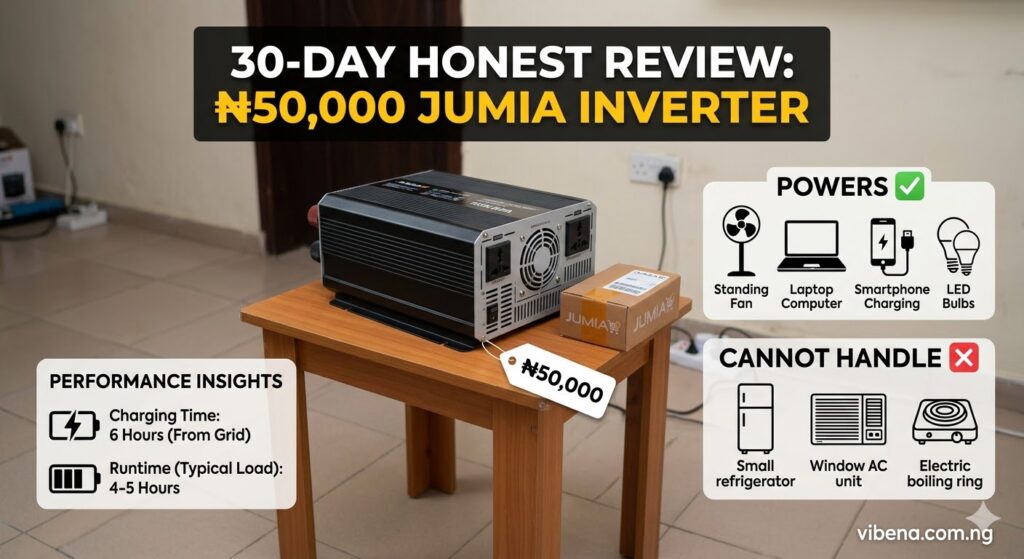
Inverter: SUOER 1000W Modified Sine Wave Inverter with Built-In Charger Input voltage: 12V DC Output voltage: 220V AC Wattage: 1000W continuous, 2000W peak (surge) Wave type: Modified sine wave Built-in charger: 10A AC to DC charger Price paid: ₦48,500 on Jumia (February 2026) Protection features: Overload, short circuit, over-temperature, low battery, reverse polarity
Battery: 100Ah 12V deep-cycle lead-acid battery (no-name brand from Balogun Street) Price paid: ₦42,000 Type: Sealed maintenance-free VRLA
Total setup cost: ₦90,500
According to data from PowMr’s 2026 Nigerian inverter pricing guide, entry-level power inverters without built-in chargers start around ₦85,000, while mid-range all-in-one solar inverters range from ₦350,000 to ₦1,400,000. My ₦48,500 unit sits well below even the entry-level threshold for branded inverters, which tells you immediately what tier of product we are dealing with.
For comparison, according to Kara Nigeria, a Luminous Eco Volt 1.5KVA/24V pure sine wave inverter (one of the most popular branded inverters in Nigeria) ranges from about ₦90,000 to ₦175,000 for the inverter alone, excluding battery. Add two 12V batteries for the 24V system and you are looking at ₦200,000 or more total. My entire setup cost less than half of that.
The question is whether half the price means half the performance, or something worse.
Week 1: Setup, First Charging Test, and Initial Impressions
Setting It Up
The setup was surprisingly simple. The inverter came with two thick battery cables (positive and negative) with alligator clips. I connected the red cable to the battery’s positive terminal and the black cable to the negative terminal. Plugged the inverter’s AC charging cable into the wall socket. Done.
Total setup time: about 7 minutes.
The inverter has a small LCD display showing battery voltage, output wattage, and charging status. When I first connected the battery (which came partially charged at about 12.4V), the display lit up and the unit beeped once to confirm connection.
I set the whole thing up on the floor next to my desk in my room in Yaba. Not elegant, but functional. If you are interested in how to arrange things neatly, I wrote about how to set up a home office in a bedroom where space is tight.
First Charging Test
The most critical question for any inverter in Nigeria is: how fast does it charge? Because you are not charging from 24-hour grid power. You are charging from whatever NEPA gives you, which on my Band B electricity is roughly 8 to 12 hours per day, often in unpredictable chunks.
I drained the battery to 11.8V (about 40% capacity) on purpose for this first test, then plugged the charger in when NEPA restored power at 6:15 AM on a Thursday.
Charging data (battery at ~40% to full):
| Time | Battery Voltage | Status |
|---|---|---|
| 6:15 AM (start) | 11.8V | Charging |
| 7:00 AM | 12.1V | Charging |
| 8:00 AM | 12.4V | Charging |
| 10:00 AM | 12.7V | Charging |
| 12:00 PM | 12.9V | Bulk charge slowing |
| 2:00 PM | 13.1V | Float charging |
| 3:30 PM | 13.2V | Fully charged |
Total charging time from 40% to full: approximately 9 hours 15 minutes.
That is a long time. A Luminous inverter with a more powerful built-in charger (15A to 20A) would do the same job in about 5 to 6 hours. My unit’s 10A charger is the bottleneck. It simply cannot push current into the battery fast enough.
The practical implication: if NEPA gives you 6 hours of power, you will only charge from about 40% to roughly 70 to 75%. You will rarely reach a full charge from a completely drained battery in a single power window. This means you need to manage your power usage carefully to avoid deep discharges.
What the Inverter Sounded Like
Modified sine wave inverters are known for producing a faint humming sound, and this unit confirmed that reputation. When powering my standing fan, I could hear a soft but noticeable buzz from the fan’s motor. Not loud enough to disrupt work, but audible in a quiet room.
According to Luminous Nigeria, the function of inverters is to convert stored DC power into AC power. Pure sine wave inverters produce smooth, even power that matches grid electricity, while modified sine wave inverters produce a stepped waveform that can cause humming in motors and is not ideal for sensitive electronics.
More on this in a moment, because the sine wave type turned out to be one of the biggest issues with this inverter.
The Appliance Test: What It Powers and What It Cannot
Over the first two weeks, I systematically tested every appliance and device in my room to see what the 1000W inverter could handle. Here are the real results.
What It Powers Successfully
Standing fan (75W): Works fine. Slight buzz from the motor on speed 3, barely noticeable on speeds 1 and 2. Runtime on full battery: approximately 8 to 9 hours on speed 2.
LED light bulbs (3 × 10W = 30W): Perfect. No flickering, no buzzing. LEDs are not sensitive to wave type.
Phone charging (10W): Works perfectly. My Tecno charged at normal speed with no issues.
Laptop charging (HP EliteBook, 65W adapter): This one surprised me. The laptop charged, but the charger ran noticeably hotter than when connected to grid power. I measured it with my hand after 2 hours, and it was uncomfortably warm. According to independent testing data cited on SolarTechOnline, laptop power adapters run approximately 40% cooler on pure sine wave compared to modified sine wave. I did not experience immediate problems, but the excess heat concerned me for long-term adapter lifespan.
MiFi router (8W): Works perfectly. No issues at all.
Small radio (15W): This worked, but with a persistent low-frequency hum in the background audio. Not surprising for a modified sine wave inverter.
Phone ring light (18W): Works fine. I use this for content creation. No flickering.
Combined Load Test (My Actual Work Setup)
My real-world daily load during a power outage looks like this:
| Device | Wattage |
|---|---|
| Standing fan (speed 2) | 55W |
| 2 LED bulbs | 20W |
| Laptop (charging) | 65W |
| MiFi router | 8W |
| Phone charging | 10W |
| Total | 158W |
At 158W combined load, the inverter drew roughly 15 to 16 amps from the battery. My 100Ah battery at about 50% usable capacity (deep-cycle lead-acid batteries should not be discharged below 50% to preserve lifespan) gave me approximately 3 to 3.5 hours of runtime with this setup.
Three and a half hours of work. That is the reality of a budget setup. Not a full workday. Just enough to finish a task, submit a deadline, and keep your phone alive until NEPA returns.
For comparison, if I had paired this inverter with a 200Ah battery (roughly ₦75,000 to ₦90,000 for a decent one), my runtime would double to about 6 to 7 hours. That is almost a full workday for a remote worker. But the total setup cost would also jump to about ₦140,000 to ₦175,000.
What It Cannot Power (Failed Tests)
Electric iron (1200W): The inverter immediately tripped its overload protection and shut down. An iron draws more than the inverter’s 1000W continuous rating. Expected result.
Microwave (800W): The microwave started briefly, then the inverter’s overload alarm sounded and it shut down. Microwaves have a high startup surge that exceeded the inverter’s 2000W peak rating. Even though the running wattage (800W) is within range, the startup spike killed it.
Small fridge (150W running, ~600W startup): The fridge attempted to start, the compressor hummed, and the inverter struggled. Sometimes it worked. Sometimes it tripped the overload. This inconsistency is dangerous for both the inverter and the fridge compressor. I stopped testing this after the third attempt.
According to information from Genus Nigeria, modified sine wave inverters produce power in a stepped pattern where voltage rises and falls abruptly. This inconsistent current flow can be harmful to appliances with AC motors, like refrigerators and freezers, because the motors run hotter and less efficiently.
Hair dryer (1500W): Instant shutdown. Way beyond the inverter’s capacity.
Blender (350W): The blender ran, but slowly and with excessive vibration. The motor was clearly struggling with the modified sine wave. I stopped after 30 seconds to avoid damaging it.
The Modified Sine Wave Problem: Real Talk
This is the most important lesson from this 30-day test. The ₦48,500 price tag comes with a fundamental limitation: modified sine wave output.
According to Renogy’s inverter comparison guide, modified sine wave inverters are suitable for simple devices like phone chargers, heaters, and basic lighting. But appliances with AC motors (fridges, blenders, compressors), sensitive electronics (medical equipment, some newer TVs), and devices with digital timers or clocks may not operate correctly or may be damaged over time.
For a remote worker whose primary devices are a laptop, phone, fan, and lights, modified sine wave is mostly acceptable for short-term use. But the hot laptop adapter worried me. According to SolarTechOnline’s testing data, devices powered by pure sine wave inverters typically last 20 to 30% longer due to reduced heat stress.
If you are planning to use your inverter daily for years (as most Nigerians do), the long-term cost of replacing a laptop adapter or a damaged appliance could easily exceed the ₦40,000 to ₦80,000 you saved by not buying a pure sine wave unit.
Week 2: Real Work Performance and Daily Usage Notes
Monday (Day 8): The Good Day
NEPA gave us power from 5 AM to 11 AM (6 hours). I charged the battery to about 85%. Then power went off. I switched to the inverter and worked from 11 AM to 2:30 PM, about 3.5 hours, on my standard setup (fan, lights, laptop, MiFi). The inverter performed flawlessly. No alarms. No shutdowns. The LCD showed the battery voltage dropping steadily from 12.8V to about 12.0V.
I submitted two articles. Took three WhatsApp calls. Uploaded a set of Instagram posts for a client via Meta Business Suite. The internet (via MiFi) worked perfectly throughout. A productive day despite the power outage.
Wednesday (Day 10): The Bad Day
NEPA gave us power from 2 AM to 5 AM (3 hours). I was sleeping, so the inverter charged for 3 hours, going from about 12.0V to maybe 12.4V (roughly 60% charge). Then power went off and did not return for the rest of the day.
I started working at 8 AM. By 10:15 AM, the inverter’s low battery alarm started beeping. By 10:40 AM, it shut down automatically to protect the battery from deep discharge. I got 2 hours and 40 minutes of work.
The rest of the day, I worked on my phone (draining its battery), used a power bank for my laptop, and relied on offline productivity apps to keep going without internet. Not ideal. Not productive. But survival.
This day taught me the most important lesson about budget inverters: your experience is entirely dependent on how much NEPA power you get for charging. The inverter itself is just a bridge. If the bridge does not get enough input (charging hours), it cannot provide enough output (work hours).
Friday (Day 12): The Overload Incident
My girlfriend visited and plugged in her hair straightener (about 250W) without telling me while I was working on my laptop with the fan and lights running. The total load jumped to about 400W, which is within the inverter’s 1000W rating. But the straightener’s heating element drew a brief startup surge, and combined with my existing load, the inverter beeped aggressively and shut down for about 15 seconds before auto-restarting.
Nothing was damaged. But the scare reminded me: a 1000W inverter has very little headroom. At 158W of base load, I only have about 842W of remaining capacity. That sounds like a lot until you realise that most heating appliances surge far beyond their rated wattage at startup.
Week 3: Battery Health Observations and Charging Patterns
By Week 3, I had developed a rhythm.
My Daily Charging Pattern
| Power Window | Hours | Battery Charge Gained |
|---|---|---|
| NEPA: 5 AM to 9 AM (typical morning window) | 4 hours | ~30% (from 40% to 70%) |
| NEPA: 6 PM to 11 PM (typical evening window) | 5 hours | ~35% (from 50% to 85%) |
| Generator (neighbour’s, if I run an extension) | 2 to 3 hours | ~20% |
On days when NEPA gave two separate power windows totalling 8 or more hours, I could get the battery to 85 to 95% charge. On days with only 4 to 5 hours of grid power, I was stuck at 60 to 70%, which translated to only 2 to 2.5 hours of work runtime.
The Battery Temperature Issue
During Week 3, Lagos temperatures hit 35°C indoors during the afternoon. I noticed the battery getting warm during charging, hotter than I was comfortable with. Lead-acid batteries generate heat during charging and discharging, and in a hot room with no ventilation around the battery, this is a concern.
I moved the battery closer to the window where it could get airflow from the fan, and the temperature stabilised. But this is something budget inverter buyers need to be aware of: battery placement matters, especially during the current heat wave. I wrote about how to cool a room without AC, and keeping your battery area ventilated is just as important as keeping yourself cool.
Charging Efficiency
I noticed that the inverter’s built-in 10A charger does not have sophisticated multi-stage charging. Premium inverters like the Luminous Eco Volt use Adaptive Battery Charging Control (ABCC) technology with three-stage charging (bulk, absorption, float) that optimises charging speed and battery longevity. According to NaijaTechGuide, the Luminous ABCC system enhances battery life by about 70%.
My budget inverter appears to use a simple two-stage charger (constant current, then float). This is less efficient, charges slower, and does not optimise for battery health the way premium chargers do. Over months and years, this will likely result in faster battery degradation.
Week 4: Honest Assessment and Running Costs
What My Monthly Power Costs Look Like Now
Before the inverter, I was spending roughly ₦1,500 to ₦2,000 per day on the neighbour’s generator (at the current petrol price of ₦1,200 per litre) for about 4 to 5 hours of electricity. That is ₦45,000 to ₦60,000 per month. You can check the exact numbers using my generator fuel cost calculator.
With the inverter, my monthly power cost is essentially ₦0 ongoing because it charges from the grid. The only cost is the eventual battery replacement (lead-acid batteries last 2 to 3 years with proper care) and the electricity consumed during charging (minimal).
Even at the worst case, replacing the battery every 2 years at ₦42,000 works out to ₦1,750 per month. Compare that to ₦45,000 to ₦60,000 per month on generator fuel. The savings are enormous.
The inverter’s ₦90,500 total cost paid for itself within 2 months of reduced generator dependency.
Battery Health at Day 30
At the 30-day mark, the battery is holding charge well. No noticeable degradation in runtime. The voltage readings are consistent with a healthy battery. But 30 days is nothing in battery lifespan terms. The real test is 6 to 12 months.
I am planning to do a follow-up review at the 6-month mark to report on long-term battery health and inverter reliability. For now, the system is working as expected.
The Honest Comparison: This Inverter vs What I Actually Need
After 30 days, here is my honest comparison between what this budget inverter provides and what I actually need as a remote worker:
| Need | What This Inverter Provides | Verdict |
|---|---|---|
| Power my laptop for 8 hours | ~3 to 3.5 hours (with 100Ah battery) | Not enough |
| Clean power for sensitive electronics | Modified sine wave (generates excess heat) | Risky long-term |
| Power a fan all night for sleep | ~8 to 9 hours (fan only) | Adequate |
| Quick charging in short power windows | 10A charger (very slow) | Frustrating |
| Power a fridge | Cannot reliably start compressor | Failed |
| Silent operation | Silent (zero noise) | Excellent |
| Affordable entry point | ₦90,500 total | Excellent |
The inverter does exactly what a ₦50,000 inverter should do: it provides basic backup power for lights, a fan, and phone charging. It can keep a remote worker going for 2 to 3 hours during an outage if you are careful with your load management.
But it falls short of what most remote workers actually need for a full workday.
Who Should Buy a Budget Inverter Like This
Students who need to charge phones, run a fan, and keep a few lights on during evening study hours. The 100Ah battery can handle this light load for 8 or more hours easily. If you are managing a tight budget, I wrote about how to save ₦10,000 monthly on NYSC allowance and this inverter is a practical investment.
Light-use remote workers who primarily work on their phone (WhatsApp, social media management, light browsing) and only occasionally need laptop power. The inverter can keep your MiFi running, your phone charged, and a fan spinning for 4 to 6 hours.
Anyone who wants to stop depending on a generator for basic evening power. Even at its limitations, this inverter is silent, fuel-free, and costs nothing to operate after the initial purchase. For self-care in the evenings, having light and a fan without generator noise is genuinely life-improving.
Who Should NOT Buy This Inverter
Freelancers and remote workers who work 6 or more hours daily on a laptop. You need a pure sine wave inverter (minimum 1.5KVA) with a 200Ah battery or a proper solar inverter setup to sustain a full workday.
Content creators who use recording equipment, monitors, or editing workstations. Modified sine wave power will introduce noise into audio recordings and may damage sensitive equipment over time.
Anyone who needs to power a refrigerator, freezer, or any appliance with a compressor motor. The modified sine wave and the 1000W limit make this impossible.
Anyone expecting an “AC replacement.” This is a backup solution for basic devices, not a whole-house power system.
What I Wish I Had Bought Instead
With 30 days of hindsight, here is what I would recommend if you can stretch your budget:
The Budget Sweet Spot: Luminous Eco Volt 1.5KVA + 200Ah Battery
Estimated cost: ₦175,000 to ₦250,000 total Wave type: Pure sine wave Charger: 15A to 20A with ABCC technology Runtime with fan + laptop + lights: 6 to 7 hours
This is what I am saving toward. The Luminous Eco Volt is widely available across Nigeria, has service centres in most major cities, and delivers pure sine wave power that is safe for all electronics. The faster charger means you can fully charge a 200Ah battery in about 6 to 8 hours, which is achievable in a single NEPA power window.
According to Luminous Nigeria, their inverters feature DSP-controlled technology with overload and short circuit protection, and they deliver pure sine wave output that prevents humming and ensures appliance safety.
The Long-Term Investment: Solar Hybrid System
If you can afford ₦350,000 or more, a solar hybrid inverter system eliminates your dependency on NEPA entirely. I wrote extensively about the cost of solar power for a 3-bedroom flat and someone who recently switched from generator to solar after fuel hit ₦1,200. Solar is the endgame. The budget inverter is a stepping stone.
Tips for Getting the Most Out of a Budget Inverter
If you are going ahead with a budget setup like mine, here are the lessons from my 30 days:
Minimise Your Load Ruthlessly
Every watt counts. Use LED bulbs instead of fluorescent tubes (10W vs 40W). Use your fan on speed 1 or 2 instead of 3. Charge your laptop to 100% during grid power and then use it on battery power during outages instead of charging it through the inverter.
Charge Whenever Power Is Available
Do not wait until the battery is low. Plug in the charger every time NEPA brings power, even if the battery is at 70%. Every percentage point of charge extends your runtime. Set a reminder on your phone to plug in the inverter the moment you notice the lights come on.
Do Not Deep Discharge the Battery
Lead-acid batteries lose lifespan rapidly when discharged below 50%. The inverter’s low-battery shutdown is set at about 10.5V to 11V, which corresponds to roughly 30 to 40% charge. Ideally, you should manually switch off the inverter at 12.0V (about 50% charge) to preserve battery life.
Keep the Battery Ventilated
Do not place the battery inside a closed cupboard or directly against a wall with no airflow. Lead-acid batteries generate hydrogen gas during charging (in small amounts) and heat during both charging and discharging. Keep it in a well-ventilated area away from flammable materials.
Invest in a Good Power Bank as Backup
A 50,000mAh power bank costs about ₦15,000 to ₦25,000 and can charge your laptop 1 to 2 times and your phone 8 to 10 times. Combined with the inverter, this gives you a layered backup system: inverter for fan and lights, power bank for laptop and phone when the inverter battery runs low.
Frequently Asked Questions
Can a ₦50,000 inverter power a laptop?
Yes, but with caveats. A modified sine wave inverter will charge your laptop, but the power adapter may run hotter than normal, which can shorten its lifespan over time. For occasional use (2 to 3 hours during outages), this is acceptable. For daily 8-hour use, invest in a pure sine wave inverter to protect your equipment.
How long will a 100Ah battery last on an inverter?
It depends entirely on your load. At 158W (fan, lights, laptop, MiFi, phone charger), a 100Ah 12V battery provides roughly 3 to 3.5 hours of runtime (using 50% of battery capacity to preserve lifespan). At lighter loads (fan and lights only, about 85W), you can get 5 to 6 hours.
Is a modified sine wave inverter safe for electronics?
For basic devices like phone chargers, LED lights, and fans, yes. For sensitive electronics like laptops, audio equipment, and smart TVs, a pure sine wave inverter is strongly recommended. According to the Luminous Nigeria blog, pure sine wave inverters produce power that equals or is better than grid power, ensuring the safety of all your appliances.
What is the best cheap inverter brand in Nigeria?
Among budget inverters, Luminous offers the best balance of affordability and quality. Their Eco Volt series starts at a higher price than unbranded units but delivers pure sine wave output, better charging technology, and nationwide service support. According to NaijaTechGuide, Luminous inverter prices range from ₦67,000 to ₦1,600,000 depending on capacity, with the 900VA and 1.5KVA models being most popular for small apartments.
Should I buy an inverter or a portable solar generator?
For apartment use with grid power available for charging, an inverter with battery is more cost-effective. A portable solar generator is better if you need portability or have zero grid power. For most Lagos apartments on Band B electricity, a standard inverter setup makes more financial sense.
Final Thoughts
Thirty days with a ₦50,000 inverter taught me three things.
First, even a budget inverter is better than no inverter. On the nights when I had a fan spinning and a light on while the rest of the compound sat in darkness waiting for NEPA, the ₦90,500 I spent felt like the best money I have ever used.
Second, you get what you pay for. The modified sine wave output, the slow charger, and the limited runtime are real limitations that affect daily productivity. This inverter kept me alive during outages. It did not make me forget about outages.
Third, the budget inverter is a stepping stone, not a destination. It taught me exactly what I need (pure sine wave, faster charging, bigger battery) and gave me time to save for the proper setup without bleeding money on generator fuel every day.
If you can afford ₦90,000, buy this. If you can afford ₦250,000, buy the Luminous. If you can afford ₦400,000 or more, go solar and never look back.
Your situation will dictate your choice. But doing something, even something imperfect, is always better than doing nothing and hoping NEPA shows up.
Want to improve your full work-from-home setup? Check out my guides on essential gadgets for remote work in Nigeria and how to stay focused during power outages for more practical strategies that actually work in Nigerian conditions.

Oladepo Babatunde (Prince Babatee Tunde) is a Computer Scientist, researcher, and professional content writer with a Higher National Diploma in Computer Science from Kwara State Polytechnic, Nigeria.
With a background in technology and a passion for clear communication, Babatunde specializes in creating thoroughly researched, reader-focused content on productivity, personal development, home living, and technology. Every article he writes is backed by extensive research and fact-checking to ensure readers receive accurate, actionable information.
As a freelance writer, he has helped brands and publications deliver content that educates, engages, and empowers their audiences. His mission at Vibena is simple: make complex topics easy to understand and help Nigerians live smarter, more productive lives.