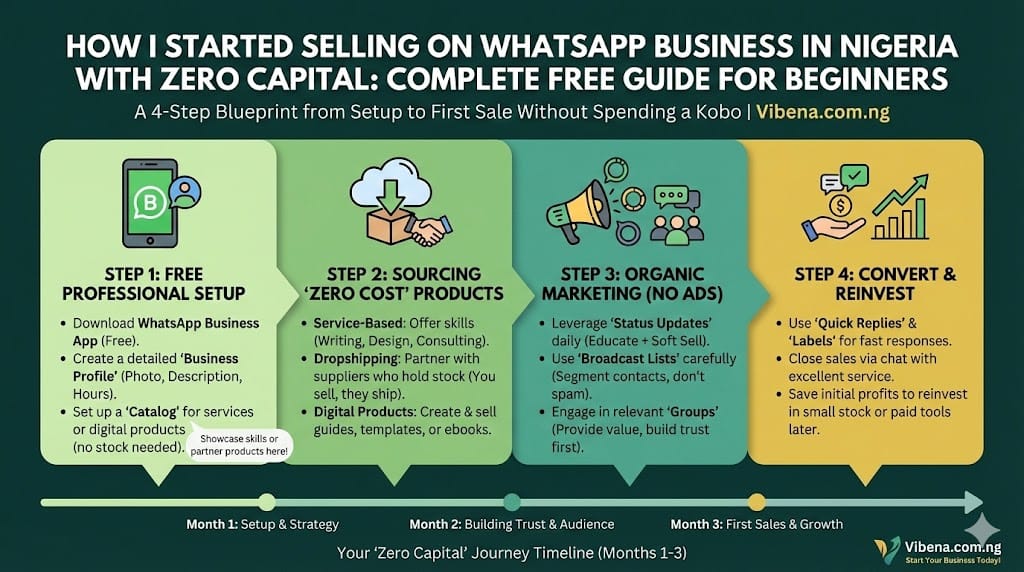
You do not need capital to start a business on WhatsApp. I know this sounds like another empty promise you have heard a hundred times, but let me explain why this one is different.
When I started my first WhatsApp business two years ago, I had exactly ₦0 to invest. No inventory, no website, no paid ads. What I had was a smartphone, an internet connection, and the free WhatsApp Business App. Within three months, I was making consistent sales without ever spending money on the platform itself.
The WhatsApp Business App is completely free to download and use. Unlike the WhatsApp Business API which charges per message, the basic app gives you everything you need to start selling today. You get a professional business profile, a product catalog, automated messages, and direct access to customers who are already spending hours on WhatsApp daily.
This guide will walk you through exactly how I did it and how you can do the same. By the end, you will have a complete roadmap from setting up your account to making your first sales without spending a single naira.
Why WhatsApp Business is Perfect for Zero Capital Selling in Nigeria
Before we dive into the how, let me explain why WhatsApp Business makes sense for Nigerians starting with nothing.
Nigeria has tens of millions of active WhatsApp users, making it one of the most popular messaging platforms in the country. Your customers are already on the platform, checking their messages multiple times every day. You do not need to convince them to download a new app or visit a website they have never heard of. You meet them where they already are.
The Free vs Paid WhatsApp Business Options
WhatsApp offers two distinct business solutions with very different cost structures.
| Feature | WhatsApp Business App | WhatsApp Business API |
|---|---|---|
| Cost | Completely FREE | Per-message pricing plus BSP fees |
| Best for | Small businesses, beginners | Large enterprises, high volume |
| Automation | Basic away messages, quick replies | Advanced chatbots, CRM integration |
| Setup time | 15 minutes | Hours to days depending on provider |
| Monthly platform fees | None | Varies by provider |
According to Flowcall’s 2026 pricing guide, WhatsApp shifted from conversation-based pricing to a per-message model effective July 1, 2025. Under this model, businesses using the API are charged each time a template message is delivered to a customer.
For messages sent to Nigerian recipients through the API, the rates are:
- Marketing messages: $0.0516 per message
- Utility messages: $0.0067 per message
- Authentication messages: $0.0067 per message
- Service messages within 24-hour customer windows: Free
These API costs also require working with a Business Solution Provider, which typically charges monthly subscriptions ranging from $50 to $500 or more depending on features and volume.
But here is what matters for you: the free WhatsApp Business App has everything a beginner needs. The API is designed for companies sending thousands of automated messages daily. You do not need it to start making money.
What the Free App Gives You
The WhatsApp Business App includes features that would cost money on other platforms:
A professional business profile that displays your business name, description, address, hours, and website. A product catalog where you can showcase items with photos, prices, and descriptions. Automated greeting messages that welcome new customers. Away messages that respond when you are offline. Quick replies that let you answer common questions with a single tap. Labels to organize conversations by customer status. Message statistics to track what is working.
All of this costs you nothing.
How to Set Up WhatsApp Business for Free in 15 Minutes
Let me walk you through the exact setup process. According to a detailed tutorial from TS Tech Talk, the entire process takes about 15 minutes if you follow these steps.
Step 1: Download the WhatsApp Business App
Open your Google Play Store or Apple App Store and search for “WhatsApp Business.” Make sure you download the official app published by WhatsApp LLC, not a third-party imitation.
The app is separate from regular WhatsApp, so you can run both on the same phone if needed. However, I recommend using a dedicated phone number for your business. This keeps your personal and business conversations separate and looks more professional to customers.
Step 2: Verify Your Phone Number
After downloading, open the app and tap “Agree and Continue.” Enter your business phone number and verify it with the code WhatsApp sends via SMS.
If you are converting from regular WhatsApp, the app will offer to transfer your chat history. This is optional but can be useful if you have been selling informally and want to keep customer conversations.
Step 3: Create Your Business Profile
This is where you start building your brand. Tap on Settings, then Business Tools, then Business Profile.
Business name: Choose carefully because this becomes your brand identity. Use something memorable and relevant to what you sell. Avoid generic names that sound like spam.
Category: Select the category that best describes your business. Options include Retail, Beauty and Cosmetics, Finance, Food and Grocery, and many others. Note that you can select up to three categories to help customers understand what you offer at a glance.
Description: Write a compelling description of your business. Explain what you sell, what makes you different, and why customers should trust you. Keep it clear and professional.
Business hours: Set your operating hours so customers know when to expect responses. If you run an online business that operates around the clock, select “Always Open.” If you have specific hours, set them accurately.
Address: Add your business location. Even if you work from home, having an address adds credibility. You can use your local government area if you prefer not to share your exact address.
Website, email, and social media: Add these if you have them. You can include your email address and social media handles to give customers multiple ways to reach you. These are not required to start but add professionalism.
Step 4: Set Up Your Product Catalog
The catalog feature turns WhatsApp into a mini online store. Setting up your catalog properly makes a huge difference in how professional your business appears.
Tap on Business Tools, then Catalog, then “Add New Item.”
For each product, you will need to add a clear photo, the product name, price in Naira, and a description explaining what the customer gets.
Photo tips: Use good lighting and clean backgrounds. Natural daylight works better than artificial light. Take multiple angles if the product has details customers need to see. Your phone camera is sufficient if you use it correctly.
Pricing: Be specific with your prices. Customers appreciate transparency. If your prices vary based on options, list the starting price and note that variations exist.
Descriptions: Include relevant details like size, color options, material, and any other information that helps customers make decisions. Answer the questions they would ask before they ask them.
You can organize products into collections for easier browsing. For example, if you sell fashion items, create collections for men, women, and accessories. As shown in the tutorial, you might create collections like “new and used” items to help customers find what they need quickly.
Step 5: Configure Automated Messages
Automation saves you time and ensures customers always get a response, even when you are busy.
Greeting message: This automatically sends to first-time customers or those who have not messaged you in 14 days. Write something welcoming that introduces your business and tells them what to do next.
Example: “Welcome to [Your Business Name]! Thank you for reaching out. Browse our catalog to see our products, or tell us what you are looking for and we will help you find it.”
Away message: This sends when you are unavailable during your set business hours. Let customers know when you will respond.
Example: “Thank you for your message! We are currently away but will respond as soon as we are back online. In the meantime, feel free to browse our catalog.”
Quick replies: Create shortcuts for messages you send frequently. When you type the shortcut keyword, you will be able to select the full message instantly.
Set up quick replies for your pricing, delivery information, payment methods, and frequently asked questions. This dramatically speeds up your response time.
If you are managing multiple responsibilities while building your business, our guide on time management for side hustlers can help you balance everything effectively.
What to Sell on WhatsApp Business Nigeria Without Capital
Now comes the important question: what do you actually sell when you have no money to buy inventory?
I tested several approaches when starting out, and these five methods work without requiring upfront capital.
Method 1: Dropshipping
Dropshipping means you market and sell products without holding inventory. When a customer orders, you forward the order to your supplier who ships directly to the customer. Your profit is the difference between your selling price and the supplier’s price.
This model works well on WhatsApp because you handle the customer relationship while someone else handles fulfillment. Many suppliers in Nigeria offer dropshipping arrangements, especially for electronics, fashion, and beauty products.
The key is finding reliable suppliers who deliver quality products on time. Start by ordering a sample to verify quality before promoting to customers.
Method 2: Affiliate Marketing
Promote other people’s products and earn commission on each sale. You share product links or codes via WhatsApp, and when someone buys through your referral, you get paid.
Digital products like online courses, software subscriptions, and e-books often have affiliate programs with commissions ranging from 20% to 50%. Physical product marketplaces also offer affiliate opportunities, though commissions are typically lower.
Your job is marketing and customer relationships. You never touch the product.
Method 3: Digital Products and Services
Create something once and sell it unlimited times. E-books, templates, guides, and online courses require time to create but zero production cost after the initial work.
What do you know that others would pay to learn? Your expertise in any area, whether it is cooking, fitness, exam preparation, or a professional skill, can become a digital product.
Services work the same way. Freelance writing, graphic design, virtual assistance, tutoring, and consulting all require your time and skills rather than capital.
Our guide on starting freelance writing in Nigeria without experience covers how to begin offering services even as a complete beginner.
Method 4: Reselling with Supplier Credit
Some suppliers offer products on credit or consignment, meaning you pay them after you sell. This requires building relationships and proving you can move products, but it eliminates the need for upfront inventory investment.
Start small. Approach a supplier with a specific request: “Can I take five items to sell? I will pay you within one week.” Deliver on your promise, and they will trust you with larger quantities.
Method 5: Pre-Orders and Made-to-Order
Collect payment before production or purchase. This works especially well for custom items, food businesses, and fashion.
If you make items yourself or can commission them, take orders and deposits before creating the product. Your customer’s payment funds the production.
What Sells Very Fast in Nigeria on WhatsApp
Based on what I have seen work for myself and others, certain product categories consistently perform well on WhatsApp in Nigeria.
| Category | Why It Sells | Capital Needed |
|---|---|---|
| Fashion items | High visual appeal, repeat purchases | Can dropship or take pre-orders |
| Beauty and skincare | Repeat customers, high margins | Can affiliate or resell |
| Phone accessories | Universal need, low price point | Minimal, can start with credit |
| Food items | Daily necessity, local demand | Ingredients only, made to order |
| Digital services | No physical product | Zero capital, just your skills |
| Educational content | Parents invest in children | Create yourself |
The common thread is products with visual appeal that you can showcase through photos on your catalog and WhatsApp Status.
How to Attract Customers on WhatsApp Without Spending Money
Having products means nothing without customers. Here are the strategies that worked for me without spending on advertising.
Strategy 1: Start With Your Personal Network
Your first customers are people who already know and trust you. Announce your business to friends, family, and acquaintances. Ask them to spread the word if they know anyone who needs what you sell.
This feels uncomfortable for many people, but it is how most businesses start. Your network wants to support you. Give them the opportunity.
Strategy 2: How to Sell on WhatsApp Status for Free Visibility
WhatsApp Status is your free advertising billboard. Every photo, video, or text you post is visible to all your contacts for 24 hours.
Post product photos daily. Share customer testimonials. Show behind-the-scenes content of your business. Create time-limited offers that encourage immediate action.
The key is consistency. Post multiple times daily. Your contacts will start associating you with your products.
Unlike broadcast messages which only reach contacts who have saved your number, Status posts are visible to all your contacts regardless of whether they saved you. This makes Status more reliable for broad reach.
Strategy 3: Join Relevant WhatsApp Groups
Find groups where your potential customers gather. If you sell baby products, join parenting groups. If you sell fashion, join style groups. If you offer services, join professional groups.
But here is the important part: do not spam. Provide value first. Answer questions, share helpful information, and become a trusted member of the community. When people see your expertise, they naturally become interested in your business.
Strategy 4: Cross-Promote on Free Social Platforms
Use Instagram, Facebook, Twitter, and TikTok to drive traffic to your WhatsApp. Add your WhatsApp link to your bio on every platform. Post content that interests your target customers and invite them to message you on WhatsApp for more information.
TikTok product demonstrations can be especially effective for driving WhatsApp inquiries. Our guide on monetizing TikTok in Nigeria explains how to build an audience on that platform.
Strategy 5: Encourage Customer Referrals
Happy customers are your best marketers. After a successful sale, ask customers to recommend you to friends who might need similar products. Offer a small discount or bonus for successful referrals.
Word of mouth is powerful in Nigeria. People trust recommendations from people they know.
How to Use WhatsApp for Marketing Without Paid Ads
The free WhatsApp Business App offers several ways to market your products without spending money.
Broadcast Lists for Mass Messaging
Create a broadcast list to send the same message to up to 256 contacts at once. Each recipient receives the message as if it were sent directly to them, not as a group message.
Critical limitation: only contacts who have saved your number in their phone will receive broadcast messages. If they have not saved you, the message simply does not deliver.
Strategy: ask customers to save your number. Include this request in your greeting message and after successful transactions.
Catalog Sharing
Share individual products or your entire catalog directly in conversations. This provides a professional presentation without needing a website and makes it easy for customers to browse and order.
Quick Replies for Efficiency
Pre-written answers to common questions save time and ensure consistent, professional communication. When a customer asks about pricing, delivery, or payment options, you can respond in seconds with accurate information.
WhatsApp Advertising for Scaling
When you are ready to invest in growth, WhatsApp does offer paid advertising options. You can create an advert directly within the app that, when people see it, they can click on it and come directly to your WhatsApp. This is useful for scaling beyond your immediate network, but it is entirely optional and not needed when starting with zero capital.
WhatsApp Business Messaging Limits You Need to Know
Understanding messaging limits helps you plan your customer outreach effectively.
For Unverified Businesses
WhatsApp limits how many new conversations unverified businesses can initiate daily. These limits are designed to prevent spam while allowing legitimate small businesses to operate. The exact number varies, but most small sellers find it sufficient for normal operations.
Important clarification: this limit applies only to business-initiated conversations. When a customer messages you first, that conversation does not count toward your limit. You can respond to unlimited customer inquiries.
For Verified Businesses
Once you complete business verification through Meta, your limits increase automatically based on usage and quality rating. Verified businesses can reach significantly more customers daily, with limits scaling as you maintain good standing.
The 24-Hour Customer Service Window
This is crucial for keeping your messaging flexible and your costs at zero if you ever move to the API.
When a customer messages you first, you have a 24-hour window to send free-form replies. You can say anything, send any content, and engage in natural conversation without restrictions.
After 24 hours without customer interaction, the window closes. For API users, messaging that customer again would require pre-approved template messages.
Strategy: Always encourage customers to message you first. End conversations with invitations like “Message me anytime you have questions!” This keeps the 24-hour window open and your communication unrestricted.
According to Flowcall’s pricing documentation, service messages responding to customers within these 24-hour windows remain free even for API users, making this a valuable cost-saving strategy.
How to Send Messages to Many Customers for Free
The free WhatsApp Business App does not support true bulk messaging, but it offers methods to reach multiple people efficiently.
Broadcast Lists
Create lists of up to 256 contacts each. Send one message to the entire list. Each recipient sees it as a personal message.
Limitation: Only reaches contacts who saved your number.
WhatsApp Status
Reaches all your contacts regardless of whether they saved your number. Post multiple times daily. Product photos in the morning, testimonials in the afternoon, special offers in the evening. Keep your business visible.
Personal Follow-Up Messages
For high-value prospects or inactive customers, personal messages work better than broadcasts. Take time to write individual messages that reference past conversations or specific interests.
This is time-consuming but generates higher response rates than generic broadcasts.
What You Should Avoid
Do not use third-party bulk messaging tools with the free app. Do not purchase contact lists. Do not send unsolicited messages to people who have not consented. These practices violate WhatsApp’s terms and can result in account suspension.
WhatsApp Business Limitations and How to Work Around Them
The free app has constraints you should understand.
No Advanced Automation
The free app supports basic greeting and away messages but not sophisticated chatbots. You cannot create complex automated flows that respond differently based on customer inputs.
Workaround: use quick replies extensively. Build a library of responses for common scenarios and you can respond almost as fast as a bot.
No CRM Integration
The free app does not connect to customer relationship management software. You cannot automatically log conversations or sync customer data.
Workaround: use labels to organize conversations manually. Create labels like “New Lead,” “Pending Payment,” “Ready to Ship,” and “Completed” to track customer status.
Broadcast Reach Limitations
As mentioned, broadcasts only reach contacts who saved your number.
Workaround: focus on building genuine relationships where customers want to save your number. Provide enough value that they do not want to miss your messages.
Manual Order Management
The free app has no built-in order processing. You track orders manually.
Workaround: create a simple system using Google Sheets or a notebook. Record customer name, products ordered, payment status, and delivery status for each transaction.
Linking to Other Devices
You can link your WhatsApp Business to your PC through WhatsApp Web, which helps when managing higher volumes of conversations. This allows you to type faster and handle multiple chats more efficiently.
If you are working from home, our guide on setting up a home office in a bedroom can help you create an organized workspace for managing your business.
Building Your First 100 Customers Without Spending Money
Here is a realistic timeline for growing from zero to 100 customers using only free methods.
Weeks 1 to 2: Foundation
Complete your business profile setup. Add at least 10 products to your catalog with quality photos and descriptions. Create all automated messages. Test everything by having a friend message you.
Announce to your personal network. Be specific about what you sell and who would benefit. Ask contacts to share with anyone who might be interested.
Weeks 3 to 4: Expansion
Post on WhatsApp Status at least three times daily. Join five to ten WhatsApp groups relevant to your products. Participate genuinely in group conversations before mentioning your business.
Ask your first customers for testimonials and referrals. Screenshot positive feedback (with permission) to use in future marketing.
Month 2: Growth Acceleration
Cross-promote on Instagram, Facebook, and TikTok. Share your WhatsApp link everywhere. Create valuable content related to your products that attracts potential customers.
Consider verifying your business with Meta to access higher messaging limits. This is free and demonstrates legitimacy to customers.
Follow up with leads who showed interest but did not buy. Sometimes people need multiple touchpoints before purchasing.
Common Mistakes Nigerian WhatsApp Sellers Make
I made several of these mistakes when starting out. Learn from my experience.
Spamming contacts: Adding people to groups without permission or sending unsolicited promotional messages gets you blocked and reported. It can lead to account suspension. Always get consent before marketing to someone.
Incomplete business profile: A bare profile with no description, hours, or photos looks unprofessional. Customers judge your legitimacy based on your profile. Complete every section.
Poor product photos: Dark, blurry, or cluttered photos kill sales. Your product might be excellent, but bad photos make it look cheap. Invest time in taking good pictures with natural lighting.
Slow responses: Customers expect quick replies on WhatsApp. When you take hours or days to respond, they buy from your competitor who answered immediately. Use quick replies and check messages frequently.
No follow-up: Many potential customers need multiple interactions before purchasing. If someone showed interest but did not buy, follow up after a few days. Ask if they have questions or if you can help them decide.
Ignoring Status: The Status feature is free marketing space that many sellers neglect. Posting once a week is not enough. Make it part of your daily routine.
Legal Considerations for WhatsApp Selling in Nigeria
Operating legally protects you and builds customer trust.
Customer Consent
You must have customer consent before sending marketing messages. This typically means they messaged you first, subscribed to your updates, or explicitly agreed to receive messages. Always provide a way for customers to opt out.
Business Registration
You do not need CAC registration to start, but it becomes valuable as you grow. Registration adds credibility, enables opening business bank accounts, and may be required for certain payment processors.
Consumer Protection
Deliver what you promise. If your product description says something, the actual product must match. Have clear policies for returns and refunds. Honest dealings build reputation and prevent disputes.
Scaling Your WhatsApp Business Without Heavy Capital
As your business grows, you can reinvest profits rather than seeking outside capital.
Stage 1: Manual Operations (0 to 50 orders monthly)
Handle everything yourself. Reinvest all profits into inventory or marketing tools. Focus on learning what sells and refining your processes.
Stage 2: Increased Efficiency (50 to 200 orders monthly)
Use quick replies for everything possible. Consider hiring part-time help for fulfillment. Your time becomes more valuable than doing every task yourself.
At this stage, you might explore the WhatsApp Business API if you need advanced automation. According to Flowcall’s documentation, for Nigerian recipients, marketing messages cost $0.0516 per message through the API, while utility and authentication messages cost $0.0067 each. Service messages within 24-hour windows remain free. You would also pay Business Solution Provider fees which vary by provider.
Stage 3: Full Business Operations (200+ orders monthly)
Integrate proper CRM tools. Automate order processing. Hire dedicated customer service staff. Your role shifts from doing to managing.
By this point, your business generates enough revenue to justify platform investments. You scale using profits, not outside capital.
For students looking to start while still in school, our guide on student side hustles covers how to balance business building with academic responsibilities.
Your 7-Day Action Plan
Here is exactly what to do in your first week:
| Day | Task |
|---|---|
| Day 1 | Download WhatsApp Business App, complete business profile |
| Day 2 | Add 10 products to your catalog with quality photos |
| Day 3 | Set up greeting message, away message, and 5 quick replies |
| Day 4 | Announce your business to personal contacts |
| Day 5 | Post your first WhatsApp Status promotion |
| Day 6 | Join 3 WhatsApp groups relevant to your products |
| Day 7 | Follow up with everyone who showed interest |
By the end of this week, you will have a functioning WhatsApp business and potentially your first customers.
Frequently Asked Questions
How do I sell on WhatsApp for free?
Download the free WhatsApp Business App, set up your business profile, add products to your catalog, and promote through WhatsApp Status and your personal network. The app costs nothing to use.
How many messages can I send per day on WhatsApp Business?
The free app has daily limits on business-initiated conversations to prevent spam. Customer-initiated conversations have no limit, so you can respond to as many inquiries as you receive. The specific limit depends on your account status and history.
What is the 24-hour rule for WhatsApp Business?
When a customer messages you first, you have a 24-hour window to send unlimited free-form replies. After 24 hours without customer interaction, you need to initiate a new conversation. For API users, this would require pre-approved template messages, but for free app users, you simply start a new conversation.
Is it legal to send lots of text messages on WhatsApp?
Yes, but you must have customer consent. Sending unsolicited messages violates WhatsApp’s terms and can result in account suspension. Always get permission before adding someone to marketing communications.
What business can I start with no capital?
Dropshipping, affiliate marketing, digital products, and service-based businesses all work on WhatsApp without capital. You market products without holding inventory or invest your skills rather than money.
How do I attract customers on WhatsApp?
Use WhatsApp Status daily, join niche WhatsApp groups, leverage your personal network, cross-promote on free social platforms, and provide valuable content that builds trust.
What sells very fast in Nigeria on WhatsApp?
Fashion items, beauty products, phone accessories, food items, and digital services consistently sell well. Focus on products with visual appeal and repeat purchase potential.
How do I get verified on WhatsApp Business?
Apply through Meta Business Manager. You need a valid business name, clear business category, and verification documents. The process is free and can increase your messaging capabilities.
Can I use WhatsApp Business on multiple devices?
Yes, through WhatsApp Business Web. Link your phone to a computer browser to manage conversations from both devices. This helps when handling higher volumes.
How much does WhatsApp Business API cost for Nigerian businesses?
According to Flowcall’s 2026 pricing guide, sending messages to Nigerian recipients through the API costs $0.0516 for marketing messages and $0.0067 for utility and authentication messages. Service messages within 24-hour customer windows are free. You would also pay BSP platform fees which vary by provider.
Start Today
WhatsApp Business gives you everything you need to start selling without capital. The app is free. Your smartphone and internet connection are tools you already have. The customers are already on the platform waiting.
What separates people who build successful WhatsApp businesses from those who just talk about it is action. Download the app today. Set up your profile this week. Make your first sale this month.
Capital is not your barrier. Waiting is.

Oladepo Babatunde (Prince Babatee Tunde) is a Computer Scientist, researcher, and professional content writer with a Higher National Diploma in Computer Science from Kwara State Polytechnic, Nigeria.
With a background in technology and a passion for clear communication, Babatunde specializes in creating thoroughly researched, reader-focused content on productivity, personal development, home living, and technology. Every article he writes is backed by extensive research and fact-checking to ensure readers receive accurate, actionable information.
As a freelance writer, he has helped brands and publications deliver content that educates, engages, and empowers their audiences. His mission at Vibena is simple: make complex topics easy to understand and help Nigerians live smarter, more productive lives.