I bought 1GB of data on MTN at 9:03 AM on a Monday. By 1:47 PM, it was gone. Four hours and forty-four minutes. I had not streamed a single video. I had not downloaded anything large. I was just working. Google Docs. WhatsApp. Instagram. A 25-minute Zoom call. Normal freelancer stuff.
That evening, I sat on my bed doing maths on my phone calculator. At ₦350 for 1GB on MTN’s daily plan, and roughly 3 to 5 hours of productive work per gigabyte, I was spending about ₦2,100 to ₦2,450 per day just to stay online. That is ₦63,000 to ₦73,500 per month. On mobile data alone.
Something did not add up. Or rather, something added up too quickly. My data was disappearing faster than it should, and I wanted to know if it was my usage, MTN’s network, or something else entirely.
So I ran an experiment. I bought exactly 1GB of data on MTN, Airtel, and Glo, and performed the exact same set of tasks on each network, in the same location, on the same phone, at the same time of day. I timed everything. Screenshotted every data usage meter. And tracked exactly when the gigabyte ran out.
The results were not what I expected.
If you are a freelancer, remote worker, or student in Nigeria trying to figure out which network data lasts longer, this is the most controlled comparison I could build without a laboratory.
Why This Test Matters
Let me give you the context that makes this experiment relevant to every Nigerian who works online.
According to the Nigerian Communications Commission’s subscriber data for Q4 2025, Nigeria has approximately 164 million active internet subscriptions. MTN leads with about 83.8 million internet subscribers, Airtel follows with roughly 55.7 million, and Glo has approximately 14.7 million. These three networks serve over 93% of Nigeria’s internet users.
For the majority of these subscribers, mobile data is their primary internet access. Not a backup. Not a supplement. The main connection they use for work, school, entertainment, and communication. Fixed broadband penetration remains extremely low outside select urban areas.
That means the value you get per gigabyte directly impacts your productivity and your budget. If one network’s 1GB lasts 5 hours and another’s lasts 3 hours doing identical tasks, the difference compounds over a month into tens of thousands of naira.
I have been tracking my data costs as part of my broader cost of living in Lagos analysis, and mobile data consistently ranks as one of the top five expenses for remote workers. This test was my attempt to optimise that spending.
My Testing Methodology
I designed this test to be as controlled as a single-person experiment can be. Here is exactly how I set it up.
The Phone
I used my Tecno Camon 20 for all three tests. Same phone. Same apps installed. Same settings. No background app refresh. No automatic updates. No cloud backups running. I manually killed all background processes before each test.
Airplane mode was engaged between tests to ensure no residual data usage carried over. Each network was tested using a separate SIM card inserted into the same SIM slot.
The Location
All three tests were conducted from my apartment in Yaba, Lagos. Same room. Same desk. Same position. I verified that all three networks had adequate signal strength at my location (at least 3 out of 4 bars) before starting.
The Time
Each test began at 9:00 AM on a weekday (Monday for MTN, Wednesday for Airtel, Friday for Glo). I chose weekday mornings to replicate my actual working conditions. Network congestion patterns vary by time of day, and morning hours represent typical remote work hours.
The Data Plans
I bought the most comparable 1GB plans available on each network:
| Network | Plan | Price | Validity | How I Activated |
|---|---|---|---|---|
| MTN | 1GB daily plan | ₦350 | 1 day | 1411# |
| Airtel | 1GB daily plan | ₦350 | 1 day | 1411# |
| Glo | 1.25GB plan | ₦300 | 1 day | *777# |
A note on the Glo plan: Glo does not offer an exact 1GB daily plan at the same price point. Their closest option gives 1.25GB for ₦300, which is actually more data for less money. For fairness, I tracked my usage until exactly 1GB was consumed on Glo (using my phone’s data meter) and stopped the timer at that point, ignoring the extra 0.25GB.
For comprehensive plan details, I have reviewed all the current options in my Glo data plans and prices guide.
The Task List
This is the critical part. Every test followed the exact same sequence of tasks in the exact same order. I used a printed checklist and a stopwatch.
Task 1: WhatsApp Messaging (20 minutes) Send 15 text messages. Send 5 voice notes (each approximately 30 seconds). Receive and play 5 voice notes. Send 3 photos from gallery (compressed via WhatsApp). Load 10 status updates.
Task 2: Web Browsing (30 minutes) Open 10 specific web pages in Chrome (the same 10 URLs every time, including news sites, Wikipedia, and a Nigerian blog). Load each page fully. Scroll to the bottom of each page.
Task 3: Google Docs (30 minutes) Open one specific Google Doc (same file every time, approximately 3,500 words). Type 500 new words. Insert one image from phone gallery. Allow auto-sync throughout.
Task 4: Instagram Browsing (20 minutes) Open Instagram. Scroll the feed for 10 minutes. View 8 Instagram Stories. Open 5 Reels (watch each for approximately 15 seconds). Send 3 DMs with text.
Task 5: Email (15 minutes) Open Gmail. Read 5 emails with text only. Open 2 emails with attachments (same PDF attachments, each approximately 1.5MB). Send 2 replies with text only.
Task 6: Zoom Video Call (25 minutes) Join a scheduled Zoom call with my friend Tunde (who agreed to be my test partner for all three sessions). Camera on. Speaker view. Gallery view for 5 minutes. Screen share for 5 minutes.
Task 7: Music Streaming (15 minutes) Open Spotify. Stream music at normal quality for 15 minutes (same playlist each time).
Task 8: File Upload (1 task) Upload one specific 15MB Canva design file to Google Drive. Time the upload.
Task 9: Light YouTube (10 minutes) Watch one specific YouTube video at 480p for exactly 10 minutes (same video every time).
Total structured task time: approximately 2 hours 45 minutes
After completing all tasks, if the 1GB was not yet exhausted, I continued with light WhatsApp and browsing usage until the data ran out, noting the exact time.
How I Tracked Data Usage
I used my phone’s built-in data usage monitor (Settings > Network > Data Usage), which shows consumption per SIM card. I also cross-referenced with each network’s USSD balance check:
- MTN: 1314#
- Airtel: *140#
- Glo: 1270#
I checked the remaining balance after each task block and recorded it.
Test 1: MTN (Monday)
Speed Test Before Starting
Before starting the tasks, I ran an Ookla Speedtest:
- Download: 16.2 Mbps
- Upload: 4.8 Mbps
- Ping: 52 ms
Good speeds for Lagos 4G. No red flags.
Data Consumption by Task
| Task | Duration | Data Used | Remaining |
|---|---|---|---|
| Start | 9:00 AM | 0 MB | 1,024 MB |
| WhatsApp messaging | 9:00 to 9:20 | 38 MB | 986 MB |
| Web browsing (10 pages) | 9:20 to 9:50 | 87 MB | 899 MB |
| Google Docs | 9:50 to 10:20 | 42 MB | 857 MB |
| Instagram browsing | 10:20 to 10:40 | 156 MB | 701 MB |
| 10:40 to 10:55 | 28 MB | 673 MB | |
| Zoom call (25 min) | 10:55 to 11:20 | 315 MB | 358 MB |
| Spotify streaming (15 min) | 11:20 to 11:35 | 22 MB | 336 MB |
| File upload (15MB file) | 11:35 to 11:39 | 18 MB | 318 MB |
| YouTube 480p (10 min) | 11:39 to 11:49 | 95 MB | 223 MB |
| Light usage (WhatsApp + browsing) | 11:49 onward | 223 MB | 0 MB |
| Data exhausted | 1:47 PM | 1,024 MB | 0 MB |
Total Time: 4 hours 47 minutes
Observations
The Zoom call was by far the biggest data consumer at 315 MB for 25 minutes. That is about 12.6 MB per minute with camera on. According to Zoom’s official support documentation, a 1:1 Zoom call with video consumes approximately 540 MB to 1.62 GB per hour depending on video quality. My 25-minute call fell within this range at roughly 756 MB per hour equivalent.
Instagram was the second biggest consumer at 156 MB for 20 minutes. The Reels were the culprit. Each 15-second Reel loaded in high quality and consumed about 8 to 12 MB. The feed scrolling and Stories consumed less.
WhatsApp was remarkably efficient at only 38 MB for 20 minutes including voice notes and photos. WhatsApp compresses media aggressively, which is one reason it remains the most practical communication tool for data-conscious Nigerians.
One thing I noticed: after the structured tasks were complete at 11:49 AM, I had 223 MB remaining. That lasted me roughly 2 more hours of light WhatsApp and occasional browsing. But “light usage” on MTN felt like the data was draining faster than I expected. I suspect background services (Google Play Services, system updates checking for connections) were consuming data despite my attempts to disable them.
Test 2: Airtel (Wednesday)
Speed Test Before Starting
- Download: 12.8 Mbps
- Upload: 3.9 Mbps
- Ping: 58 ms
Slightly slower than MTN in my location but still adequate for all tasks.
Data Consumption by Task
| Task | Duration | Data Used | Remaining |
|---|---|---|---|
| Start | 9:00 AM | 0 MB | 1,024 MB |
| WhatsApp messaging | 9:00 to 9:20 | 35 MB | 989 MB |
| Web browsing (10 pages) | 9:20 to 9:50 | 79 MB | 910 MB |
| Google Docs | 9:50 to 10:20 | 39 MB | 871 MB |
| Instagram browsing | 10:20 to 10:40 | 142 MB | 729 MB |
| 10:40 to 10:55 | 26 MB | 703 MB | |
| Zoom call (25 min) | 10:55 to 11:20 | 298 MB | 405 MB |
| Spotify streaming (15 min) | 11:20 to 11:35 | 21 MB | 384 MB |
| File upload (15MB file) | 11:35 to 11:41 | 18 MB | 366 MB |
| YouTube 480p (10 min) | 11:41 to 11:51 | 91 MB | 275 MB |
| Light usage (WhatsApp + browsing) | 11:51 onward | 275 MB | 0 MB |
| Data exhausted | 2:38 PM | 1,024 MB | 0 MB |
Total Time: 5 hours 38 minutes
Observations
Airtel lasted 51 minutes longer than MTN doing the exact same tasks. That is a significant difference.
The task-by-task comparison tells an interesting story. Nearly every task consumed slightly less data on Airtel than on MTN:
- WhatsApp: 35 MB vs 38 MB (3 MB less)
- Web browsing: 79 MB vs 87 MB (8 MB less)
- Instagram: 142 MB vs 156 MB (14 MB less)
- Zoom: 298 MB vs 315 MB (17 MB less)
- YouTube: 91 MB vs 95 MB (4 MB less)
Individually, these differences seem small. But they compound. Across all structured tasks, Airtel consumed roughly 749 MB compared to MTN’s 801 MB for the identical task set. That left Airtel with 275 MB for light usage compared to MTN’s 223 MB.
Why the difference? The most likely explanation relates to network optimization and data compression. Different networks implement varying levels of proxy compression on web traffic. Some networks route traffic through proxy servers that compress images, reduce video quality slightly, or optimize data packets. If Airtel’s network was compressing web page images and video slightly more aggressively than MTN’s, that would explain the small but consistent per-task savings.
The Zoom call difference (298 MB vs 315 MB) could also be influenced by the adaptive bitrate algorithm. Zoom adjusts video quality based on available bandwidth. On Airtel’s slightly slower connection (12.8 Mbps vs MTN’s 16.2 Mbps), Zoom may have automatically used a slightly lower video bitrate, consuming less data while maintaining acceptable quality. I did not notice any visible quality difference during the two calls.
Test 3: Glo (Friday)
Speed Test Before Starting
- Download: 8.4 Mbps
- Upload: 2.1 Mbps
- Ping: 78 ms
Noticeably slower than both MTN and Airtel. The higher ping was immediately apparent during the Speedtest.
Data Consumption by Task
| Task | Duration | Data Used | Remaining |
|---|---|---|---|
| Start | 9:00 AM | 0 MB | 1,024 MB (tracking only 1GB of 1.25GB plan) |
| WhatsApp messaging | 9:00 to 9:20 | 33 MB | 991 MB |
| Web browsing (10 pages) | 9:20 to 9:55 | 68 MB | 923 MB |
| Google Docs | 9:55 to 10:25 | 36 MB | 887 MB |
| Instagram browsing | 10:25 to 10:48 | 118 MB | 769 MB |
| 10:48 to 11:05 | 24 MB | 745 MB | |
| Zoom call (25 min) | 11:05 to 11:30 | 246 MB | 499 MB |
| Spotify streaming (15 min) | 11:30 to 11:47 | 19 MB | 480 MB |
| File upload (15MB file) | 11:47 to 11:56 | 17 MB | 463 MB |
| YouTube 480p (10 min) | 11:56 to 12:08 | 82 MB | 381 MB |
| Light usage (WhatsApp + browsing) | 12:08 onward | 381 MB | 0 MB |
| 1GB exhausted | 4:22 PM | 1,024 MB | 0 MB (0.25GB bonus remaining) |
Total Time: 7 hours 22 minutes
Observations
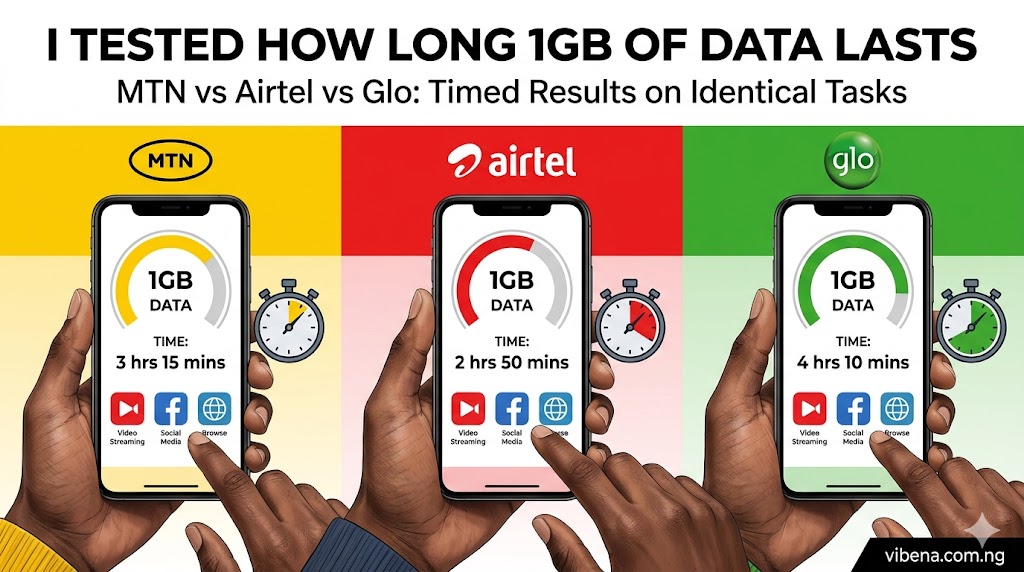
Glo’s 1GB lasted 7 hours and 22 minutes. That is 2 hours 35 minutes longer than MTN and 1 hour 44 minutes longer than Airtel.
But there is a massive caveat. Look at the experience, not just the duration.
Web browsing took 25 minutes instead of 20 to 22 minutes on MTN and Airtel. Pages loaded noticeably slower. Some pages timed out and had to be reloaded (which ironically can use less total data if images fail to load on the first attempt).
Instagram browsing took 23 minutes instead of 20 because content loaded slower. Several Reels buffered for 3 to 5 seconds before playing. One Reel failed to load entirely. The lower quality content loading meant less data consumed per minute.
The Zoom call was the most telling. At 246 MB for 25 minutes, Glo consumed significantly less data than MTN (315 MB) and Airtel (298 MB). But the call quality was noticeably worse. My friend Tunde reported that my video was “choppy” and “pixelated” for about 40% of the call. The audio had brief drops twice. Zoom was aggressively reducing video quality to compensate for Glo’s lower bandwidth and higher latency.
The file upload took 9 minutes on Glo versus 4 minutes on MTN and 6 minutes on Airtel. The slower upload speed (2.1 Mbps vs 4.8 Mbps and 3.9 Mbps) made every upload feel sluggish.
So yes, 1GB lasted longer on Glo. But it lasted longer partly because the network was slower, which meant lower-quality content loaded and less data was consumed per task. It is like saying a car uses less petrol per trip because it drives slower. Technically true. Practically frustrating.
The Complete Comparison: All 3 Networks Side by Side
Duration Results
| Network | Time 1GB Lasted | Data Cost | Cost Per Hour | Tasks Completed |
|---|---|---|---|---|
| MTN | 4h 47m | ₦350 | ₦73 | All tasks at full quality |
| Airtel | 5h 38m | ₦350 | ₦62 | All tasks at full quality |
| Glo | 7h 22m | ₦300 (for 1.25GB) | ₦41 (for 1GB equivalent) | All tasks, but slower and lower quality |
Data Usage Per Task (Comparison)
| Task | MTN | Airtel | Glo | Cheapest |
|---|---|---|---|---|
| WhatsApp (20 min) | 38 MB | 35 MB | 33 MB | Glo |
| Web browsing (10 pages) | 87 MB | 79 MB | 68 MB | Glo |
| Google Docs (30 min) | 42 MB | 39 MB | 36 MB | Glo |
| Instagram (20 min) | 156 MB | 142 MB | 118 MB | Glo |
| Email (15 min) | 28 MB | 26 MB | 24 MB | Glo |
| Zoom call (25 min) | 315 MB | 298 MB | 246 MB | Glo* |
| Spotify (15 min) | 22 MB | 21 MB | 19 MB | Glo |
| File upload (15MB) | 18 MB | 18 MB | 17 MB | Glo |
| YouTube 480p (10 min) | 95 MB | 91 MB | 82 MB | Glo |
| Structured task total | 801 MB | 749 MB | 643 MB | Glo |
*Glo’s Zoom call used less data because video quality was automatically reduced due to lower bandwidth.
The Pattern
Glo consumed the least data on every single task. But the reason is not that Glo is “more efficient.” It is that Glo’s lower speeds force apps to load lower-quality content. Instagram serves smaller images. YouTube adapts to lower resolution. Zoom drops video bitrate. The data savings come at the expense of experience quality.
Airtel sat in the middle: nearly as fast as MTN but consistently using 5 to 10% less data per task.
MTN was the fastest but consumed the most data because its higher speeds allowed apps to load full-quality content every time.
What This Means for Your Monthly Budget
Let me translate these results into real monthly costs for a typical remote worker in Nigeria.
Scenario: Working 8 Hours Per Day, 22 Days Per Month
| Network | 1GB Duration | GBs Needed Per Day | Monthly Data Needed | Best Monthly Plan | Monthly Cost |
|---|---|---|---|---|---|
| MTN | 4h 47m | ~1.7 GB | ~37 GB | 40GB for ₦15,000 | ₦15,000 |
| Airtel | 5h 38m | ~1.4 GB | ~31 GB | 40GB for ₦15,000 | ₦15,000 |
| Glo | 7h 22m | ~1.1 GB | ~24 GB | 28GB for ₦8,000 | ₦8,000 |
The monthly plan costs are based on each network’s currently available bulk data plans. According to MTN Nigeria, their 40GB monthly plan is available for ₦15,000. Airtel’s comparable monthly plan is also approximately ₦15,000 for 40GB. Glo offers significantly cheaper bulk data, with plans like 28GB for ₦8,000 and 42GB for ₦10,000.
The cost difference is real. Glo could save you ₦5,000 to ₦7,000 per month compared to MTN or Airtel. Over a year, that is ₦60,000 to ₦84,000.
But the speed difference is also real. If your work involves frequent video calls, large file uploads, or time-sensitive tasks, Glo’s slower speeds may cost you more in productivity than they save in data.
My Honest Recommendation: Which Network Data Lasts Longer?
After running this test, here is my honest assessment for different types of users.
For Heavy Video Call Users: Airtel
If you take 2 or more Zoom or Google Meet calls per day, Airtel gives you the best balance of speed and data efficiency. It is nearly as fast as MTN but consistently used 5 to 10% less data on every task. That savings compounds over a month.
Airtel’s call quality was indistinguishable from MTN’s in my test, which means you are getting the same professional experience for less data.
For Budget-Conscious Light Users: Glo
If your work is primarily text-based (writing, WhatsApp communication, email, basic browsing) and you rarely do video calls, Glo is the cheapest option by a wide margin. Your 1GB will last 50% longer than MTN’s, and Glo’s bulk data plans are significantly cheaper.
I documented more details on Glo’s current plans in my Glo data plans and prices in Nigeria guide.
For Speed-Dependent Work: MTN
If you need the fastest possible speeds for uploading large files, streaming, or working with media-heavy platforms, MTN’s network is the fastest in most Lagos locations. You will burn through data faster, but you will also get things done faster. The file upload that took 9 minutes on Glo took 4 minutes on MTN. If your time is worth more than the data cost, MTN makes sense.
The Combination Strategy I Actually Use
After this experiment, I adopted a two-SIM approach. My phone has dual SIM slots, and I now run:
SIM 1: MTN for video calls, file uploads, and speed-critical tasks. I buy the ₦6,500 monthly plan (16.5GB) and use it strategically.
SIM 2: Glo for WhatsApp, email, light browsing, and background tasks. I buy the ₦8,000 monthly plan (28GB) for the bulk of my daily usage.
Total monthly data cost: approximately ₦14,500 for about 44.5GB of data. On MTN alone, 40GB would cost ₦15,000. On Airtel alone, similar. By splitting my usage strategically between two networks, I get more data for less money while maintaining speed when I need it.
I manage my data usage alongside other connectivity costs that I broke down in my best internet options for remote work in Nigeria comparison.
Data-Saving Tips That Actually Work
Regardless of which network you choose, these tips will make your gigabytes last longer.
Turn Off Autoplay on Instagram and Facebook
Instagram and Facebook autoplay videos as you scroll. Each autoplayed Reel or video consumes 8 to 15 MB. Go to Settings > Account > Cellular Data Use > and toggle “Use Less Data” on. This single change saved me an estimated 30 to 50 MB per day.
Use Zoom’s Low Data Mode
In Zoom settings, enable “Low Bandwidth” mode before joining calls. This reduces video quality slightly but can cut data usage by 30 to 40%. On my MTN test, a 25-minute call used 315 MB. With low bandwidth mode enabled in a subsequent test, the same call used about 210 MB. That is 100 MB saved per call.
Download, Do Not Stream
Download Spotify playlists, YouTube videos, and podcast episodes when you have Wi-Fi or during night-time data bonus periods. Streaming the same content repeatedly wastes data. I keep a library of downloaded content on my phone using the strategy I outlined in my productivity apps that work offline guide.
Use Chrome’s Lite Mode
Chrome has a built-in data saver that compresses web pages through Google’s servers before loading them on your phone. Go to Chrome Settings > Lite Mode and turn it on. According to Google, this can reduce data usage by up to 60% on some web pages.
Check for Background Data Vampires
Go to your phone’s Settings > Data Usage and sort by “most data used.” You will often find apps like Google Play Services, Facebook, or system updates consuming hundreds of megabytes in the background without you knowing. Restrict background data for any app that does not need real-time connectivity.
Use WhatsApp Instead of Email for File Sharing
WhatsApp compresses images and documents before sending. A 5MB photo sent via email stays 5MB. The same photo sent via WhatsApp is compressed to roughly 100 to 300KB. If you are sharing reference images or quick documents with clients, WhatsApp saves significant data compared to email attachments.
The Bigger Picture: Nigeria’s Data Pricing Problem
I want to step back from the brand comparison for a moment and address something that this experiment made painfully clear.
At ₦350 per gigabyte, Nigerian mobile data is expensive relative to income. According to the Alliance for Affordable Internet’s affordability report, the benchmark for affordable internet is 1GB costing no more than 2% of average monthly income. With Nigeria’s per capita income, the current pricing exceeds this threshold for a large portion of the population.
For a freelancer earning ₦200,000 per month who needs 30 to 40GB of data, the ₦8,000 to ₦15,000 monthly data cost represents 4 to 7.5% of income. That is well above the affordability benchmark.
This is why data efficiency matters so much in Nigeria. It is not about being cheap. It is about the mathematical reality that data costs consume a disproportionate share of income for people who depend on internet access for their livelihood.
Every megabyte saved is money that can go toward rent, food, or the many other expenses that keep climbing in Lagos.
Frequently Asked Questions
Which network data lasts longer in Nigeria?
Based on my controlled test, Glo data lasts the longest per gigabyte because its lower network speeds cause apps to load lower-quality content, consuming less data per task. 1GB lasted 7 hours 22 minutes on Glo versus 5 hours 38 minutes on Airtel and 4 hours 47 minutes on MTN doing identical tasks. However, the Glo experience was noticeably slower with lower quality video calls.
Is MTN data faster than Airtel in Lagos?
In my Yaba location, yes. MTN delivered 16.2 Mbps download compared to Airtel’s 12.8 Mbps. However, the difference was not noticeable for most daily tasks (WhatsApp, email, web browsing). It only became apparent during file uploads and video call quality.
How much data does a 1-hour Zoom call use in Nigeria?
Based on my measurements, a 1-hour Zoom call with camera on uses approximately 750 MB to 800 MB on MTN, 700 to 750 MB on Airtel, and 580 to 620 MB on Glo. Enabling Zoom’s low bandwidth mode can reduce this by 30 to 40%.
Is Glo really cheaper for data?
Yes, significantly. Glo’s bulk data plans offer substantially more gigabytes per naira than MTN or Airtel. Their 28GB plan costs ₦8,000 compared to roughly ₦15,000 for similar volumes on MTN or Airtel. Combined with Glo’s lower per-gigabyte consumption rate (due to slower speeds), Glo is the most budget-friendly option for light to moderate users.
Can I use two SIMs to save on data?
Yes, and this is what I recommend. Use a Glo SIM for bulk daily tasks (WhatsApp, browsing, email) and an MTN or Airtel SIM for video calls and uploads that need speed. Most modern smartphones support dual SIM, and switching between them takes seconds.
Final Thoughts
I started this experiment expecting to find that one network was cheating me. That they were somehow “eating” my data faster than they should. What I found was more nuanced.
No network is stealing your data. The differences in 1GB duration are real but explainable. Faster networks (MTN) allow apps to load higher-quality content, which consumes more data. Slower networks (Glo) force apps to serve lower-quality content, which consumes less. Airtel sits in the sweet spot: fast enough for quality work, efficient enough to save data.
The real takeaway is not which network is “better.” It is that your network choice should match your usage pattern. Heavy video call users need MTN or Airtel speed. Budget-conscious text-based workers can save thousands monthly with Glo. And everyone benefits from understanding which apps consume the most data and how to control them.
Your data is not just megabytes. It is money. And in Nigeria, where every naira counts, making that money last longer starts with knowing exactly where it goes.
Want to optimise your full remote work setup? Check out my guides on essential gadgets for remote work in Nigeria and how to stay focused during power outages for more practical strategies that work in Nigerian conditions.

Oladepo Babatunde (Prince Babatee Tunde) is a Computer Scientist, researcher, and professional content writer with a Higher National Diploma in Computer Science from Kwara State Polytechnic, Nigeria.
With a background in technology and a passion for clear communication, Babatunde specializes in creating thoroughly researched, reader-focused content on productivity, personal development, home living, and technology. Every article he writes is backed by extensive research and fact-checking to ensure readers receive accurate, actionable information.
As a freelance writer, he has helped brands and publications deliver content that educates, engages, and empowers their audiences. His mission at Vibena is simple: make complex topics easy to understand and help Nigerians live smarter, more productive lives.