I was on a Zoom call with a client in London last month when my screen froze for the third time in six minutes. She stared at me through the pixelated video, waited patiently for about ten seconds, and then said: “Let us reschedule. Your connection is not great today.”
That “not great” connection was my MTN phone hotspot. The same connection I had been relying on for two years of freelance work. The same connection that had cost me a client in November because a voice note took 4 minutes to send. The same connection that buffered for 30 seconds every time I tried to upload a Canva design to Instagram.
Something had to change.
So over four weeks in February and March 2026, I used four different internet options for my remote work in Lagos. One week per option. Same work tasks. Same location. Same power conditions. I ran speed tests three times a day, tracked every disconnection, timed every upload and download, and calculated the exact cost per gigabyte for each option.
If you are a freelancer, remote worker, or student trying to choose the best internet for remote work in Nigeria, this is the most thorough comparison I can give you. No spec sheets. No marketing claims. Just real numbers from real work in a real Lagos apartment.
The 4 Internet Options I Tested
| Option | Provider/Setup | Monthly Cost | Data Allowance |
|---|---|---|---|
| Phone Hotspot | MTN 4G SIM in my Tecno Camon 20 | ₦6,500 (16.5GB monthly plan) | 16.5GB + 2GB night bonus |
| MiFi Router | MTN 4G LTE MiFi device | ₦5,500 (12.5GB monthly plan) | 12.5GB + 2GB night bonus |
| Fibre Broadband | Spectranet Home Fiber (Spectra Elite10) | ₦20,000/month | Unlimited (10 Mbps) |
| Starlink | Starlink Residential Plan (Standard Kit) | ₦57,000/month | Unlimited |
I already owned the phone and the MiFi. The Spectranet fibre was installed at a friend’s apartment in Gbagada where I worked for the fibre testing week. And the Starlink test happened at a content creator’s home in Ikeja who generously let me work from his setup for a week. I documented the full experience in my earlier review of Starlink Mini latency and real performance benchmarks in Nigeria.
My Testing Methodology
I needed consistent, repeatable conditions to make this comparison fair. Here is exactly how I structured each testing week.
The Work Tasks (Same Every Day)
Every testing day followed the same work routine, which mirrors what most Nigerian freelancers and remote workers do:
8:00 AM: Speed test using Ookla Speedtest app (download, upload, latency)
8:15 AM to 10:00 AM: Writing and research (Google Docs, web browsing, 5 to 8 Chrome tabs open)
10:00 AM to 11:00 AM: Social media management (Meta Business Suite, uploading 2 to 3 designed posts, responding to DMs)
11:00 AM to 11:30 AM: WhatsApp voice and video calls with clients (2 calls, roughly 15 minutes total)
11:30 AM: Second speed test
12:00 PM to 1:00 PM: Canva design work (creating 3 to 4 Instagram posts, downloading high-res exports)
2:00 PM to 3:00 PM: Video call on Google Meet or Zoom (1 hour meeting, camera on)
3:00 PM to 4:00 PM: File uploads and downloads (sending deliverables to clients via Google Drive, downloading reference materials)
4:00 PM: Third speed test
4:30 PM to 5:30 PM: YouTube research and light streaming (watching tutorials, reference videos at 720p)
6:00 PM: Final notes on connectivity issues, disconnections, and overall experience for the day
How I Measured
I used the Ookla Speedtest app on my phone and laptop for all speed tests, always testing from the same position in each location. I recorded download speed, upload speed, and ping/latency three times daily (morning, midday, afternoon) and averaged them.
I also tracked:
- Number of disconnections per day (defined as losing connection for more than 10 seconds)
- Zoom/Meet call quality (subjective rating from 1 to 5 based on freezing, audio drops, and video clarity)
- File upload time (uploading the same 45MB Canva export to Google Drive each day as a benchmark)
- Total data consumed per day (checked via carrier app or router dashboard)
Week 1: Phone Hotspot (MTN 4G)
This was my default setup for two years. My Tecno Camon 20 on MTN’s 4G network, tethered to my laptop via Wi-Fi hotspot. I was on the ₦6,500 monthly plan which gives 16.5GB of daytime data plus 2GB of night bonus data.
According to MTN Nigeria’s official data plans page, the ₦6,500 monthly plan provides 16.5GB of data valid for 30 days. Larger plans are available, including 25GB for ₦10,000 and 40GB for ₦15,000.
My Speed Test Results (5-Day Average)
| Time | Download | Upload | Ping |
|---|---|---|---|
| 8:00 AM | 14.2 Mbps | 5.1 Mbps | 48 ms |
| 11:30 AM | 8.7 Mbps | 3.2 Mbps | 67 ms |
| 4:00 PM | 6.3 Mbps | 2.4 Mbps | 82 ms |
| Daily Average | 9.7 Mbps | 3.6 Mbps | 66 ms |
What Happened During the Week
The morning speeds were the best part of the phone hotspot experience. At 8 AM, before network congestion kicked in, I consistently got 12 to 16 Mbps download speeds. Web pages loaded quickly. Google Docs synced without lag. Research felt smooth.
Then midday arrived. By 11:30 AM, speeds dropped to the 8 to 9 Mbps range. This is standard for Lagos. Millions of people are on MTN’s 4G network simultaneously, and the towers get congested. It was still usable for text-based work and WhatsApp, but uploading Canva designs started to take noticeably longer.
The afternoon was painful. By 4 PM, I was frequently seeing speeds below 7 Mbps, with latency climbing to 80 ms or higher. My benchmark 45MB file upload to Google Drive took an average of 3 minutes 12 seconds in the morning but 6 minutes 48 seconds in the afternoon. That is more than double.
The Zoom calls were the weakest point. Out of four scheduled video calls during the week, two had significant quality issues. On Tuesday’s call, my video froze three times in 15 minutes. On Thursday, the audio cut out for about 8 seconds during a critical moment in a client presentation. My call quality rating averaged 2.5 out of 5.
I experienced an average of 3.4 disconnections per day, mostly brief (10 to 30 seconds), but enough to interrupt a Google Docs auto-save or cause a WhatsApp voice note to fail mid-recording.
Data Consumption
My work routine consumed approximately 2.8 to 3.5GB per day. The one-hour Zoom call alone ate about 0.9GB with camera on. At 3GB per day, my 16.5GB monthly allocation would last only about 5.5 working days. I would need to buy additional data bundles at least three times per month to cover a full work schedule.
The Hidden Cost: Phone Battery
Using my phone as a hotspot for 8 to 10 hours drained the battery completely by about 3 PM. I had to keep it plugged in constantly, which generates heat and degrades battery health over time. I documented this problem in my phone battery life test article. If you rely on your phone as a hotspot, invest in a separate power bank to keep it charged.
Real Monthly Cost
- Base plan (16.5GB): ₦6,500
- Additional data needed (~45GB more): approximately ₦22,500 to ₦25,000 (buying multiple 10GB or 16.5GB top-ups)
- Realistic monthly internet cost: ₦29,000 to ₦31,500
- Effective cost per GB: approximately ₦475 to ₦510
Verdict on Phone Hotspot
Overall rating: 4/10 Best for: Emergency backup, very light users, people who mostly do text-based work Worst for: Video calls, file uploads, anyone who works more than 4 hours online daily
Week 2: MTN 4G MiFi Router
The MiFi is a dedicated mobile router the size of a small power bank. It creates a Wi-Fi network that multiple devices can connect to, using the same MTN 4G network as the phone hotspot but through a device built specifically for data.
According to NaijaTechGuide, MTN MiFi devices cost between ₦25,000 and ₦45,000 depending on the model. I used a standard MTN 4G LTE MiFi that I bought from an MTN service centre in Ikeja for ₦28,000 about a year ago.
My Speed Test Results (5-Day Average)
| Time | Download | Upload | Ping |
|---|---|---|---|
| 8:00 AM | 18.4 Mbps | 6.8 Mbps | 42 ms |
| 11:30 AM | 11.2 Mbps | 4.5 Mbps | 58 ms |
| 4:00 PM | 8.1 Mbps | 3.3 Mbps | 71 ms |
| Daily Average | 12.6 Mbps | 4.9 Mbps | 57 ms |
What Happened During the Week
The MiFi immediately performed better than the phone hotspot. Morning download speeds averaged 18.4 Mbps compared to the phone’s 14.2 Mbps. That is a 30% improvement using the same MTN network and the same SIM type.
Why the difference? A dedicated MiFi device has a better antenna than a smartphone. It is designed specifically for data connectivity, so it maintains a stronger, more stable connection to the nearest tower. My phone’s antenna has to balance voice, data, GPS, Bluetooth, and Wi-Fi simultaneously. The MiFi does one thing only: data.
The midday and afternoon speed drops were still noticeable (this is a network congestion issue, not a device issue), but the MiFi maintained higher baseline speeds throughout the day. My benchmark 45MB file upload averaged 2 minutes 28 seconds in the morning and 4 minutes 51 seconds in the afternoon. Both faster than the phone hotspot.
Zoom call quality improved significantly. Out of four calls, only one had minor issues (a brief 3-second video freeze). My call quality rating averaged 3.5 out of 5. Still not perfect, but a clear step up from the phone.
Disconnections dropped to an average of 1.8 per day, roughly half of what I experienced with the phone hotspot.
The MiFi Advantage: Your Phone Stays Free
With the MiFi handling data, my phone’s battery lasted the full workday. I could use WhatsApp, check client messages, and take calls without worrying about the hotspot draining my battery. This alone is worth the ₦28,000 device cost for any remote worker.
Real Monthly Cost
- Base plan (12.5GB): ₦5,500
- Additional data needed (~50GB more): approximately ₦25,000 to ₦30,000
- Realistic monthly internet cost: ₦30,500 to ₦35,500
- Effective cost per GB: approximately ₦490 to ₦570
The MiFi consumes slightly more data than the phone hotspot because it maintains a persistent connection and multiple devices may connect inadvertently (my neighbour’s phone auto-connected once because I had not changed the default password).
Verdict on MiFi
Overall rating: 5.5/10 Best for: Freelancers who need slightly better speed and reliability than a phone hotspot, anyone who wants to keep their phone free Worst for: Heavy video call users, streamers, anyone needing consistent high-speed uploads
Week 3: Spectranet Home Fibre (Spectra Elite10)
This was the week I moved my work to a friend’s apartment in Gbagada, Lagos, where he has a Spectranet Home Fiber installation. He is on the Spectra Elite10 plan at ₦20,000 per month, which provides unlimited data at speeds up to 10 Mbps.
According to the official Spectranet website, their Home Fiber plans start with the Elite10 at ₦20,000 and go up to the Elite40 at ₦35,000 with 40 Mbps speeds. I reviewed the full plan range in my Spectranet data plans and prices guide.
My Speed Test Results (5-Day Average)
| Time | Download | Upload | Ping |
|---|---|---|---|
| 8:00 AM | 9.4 Mbps | 4.2 Mbps | 18 ms |
| 11:30 AM | 8.8 Mbps | 3.9 Mbps | 21 ms |
| 4:00 PM | 9.1 Mbps | 4.0 Mbps | 19 ms |
| Daily Average | 9.1 Mbps | 4.0 Mbps | 19 ms |
What Happened During the Week
The first thing I noticed was the consistency. Look at the speed test table. The download speed barely changed across the day. Morning: 9.4 Mbps. Afternoon: 9.1 Mbps. That is a variation of only 0.3 Mbps across 8 hours.
Compare that to the phone hotspot where speeds dropped from 14.2 Mbps to 6.3 Mbps (a 56% drop) or the MiFi which dropped from 18.4 Mbps to 8.1 Mbps (a 56% drop). Fibre does not care about network congestion the way mobile networks do. Your connection is a dedicated physical cable running to your building.
But the real game-changer was the latency. At an average of 19 ms, the fibre connection was three times more responsive than the MiFi (57 ms) and more than three times faster than the phone hotspot (66 ms).
Low latency is what makes video calls feel natural. There is no delay between speaking and the other person hearing you. There is no “you go first, no you go first” awkward pause. My Google Meet and Zoom calls during the fibre week were flawless. All four calls ran without a single freeze, audio drop, or quality issue. Call quality rating: 5 out of 5.
My benchmark 45MB file upload averaged 1 minute 38 seconds regardless of time of day. That consistency is worth its weight in gold for a freelancer working on deadlines.
Disconnections: zero in five days. Not one.
The Limitations
The download speed of 9 to 10 Mbps is noticeably slower than the MiFi’s peak morning speeds of 18 Mbps. For basic work tasks, this does not matter. Google Docs, email, social media management, and WhatsApp all work perfectly at 10 Mbps. But if you need to download a 2GB file (like a client’s video project), the MiFi at 18 Mbps would technically download it faster than the 10 Mbps fibre.
The Spectra Elite20 plan at ₦25,000 would solve this with 20 Mbps speeds, and the Elite40 at ₦35,000 pushes it to 40 Mbps. But even the base 10 Mbps plan was adequate for everything I needed to do.
The bigger limitation is availability. Spectranet fibre is only available in parts of Lagos, Abuja, Ibadan, and Port Harcourt. My apartment in Yaba does not have Spectranet coverage. My friend in Gbagada does. If fibre is not available at your address, it simply is not an option, no matter how good the service is.
Installation also requires a one-time setup fee (which varies by location) and a physical fibre cable run to your building. If you are renting (as most Lagos freelancers are), you need your landlord’s permission for the installation.
Real Monthly Cost
- Spectra Elite10 plan: ₦20,000/month
- Data: Unlimited (no caps on the Home Fiber plans)
- Effective cost per GB: essentially ₦0 (unlimited) or roughly ₦320 per GB if you use about 60GB per month (my actual usage)
Verdict on Fibre
Overall rating: 8/10 Best for: Any remote worker who needs reliable, consistent internet for video calls, file sharing, and daily work Worst for: Anyone outside fibre coverage areas, anyone who needs portability
Week 4: Starlink Residential Plan
This was the week I was most excited about. I worked from a content creator’s apartment in Ikeja where he has a Starlink Standard Kit with the Residential Plan at ₦57,000 per month.
According to the official Starlink website, the Standard Kit costs ₦590,000 as a one-time hardware purchase. The Residential Plan subscription is ₦57,000 per month with unlimited data and no caps. According to TechCabal, Starlink officially launched in Nigeria in January 2023 and is now available across much of the country.
My Speed Test Results (5-Day Average)
| Time | Download | Upload | Ping |
|---|---|---|---|
| 8:00 AM | 68.3 Mbps | 14.2 Mbps | 38 ms |
| 11:30 AM | 42.7 Mbps | 11.8 Mbps | 45 ms |
| 4:00 PM | 51.4 Mbps | 12.6 Mbps | 42 ms |
| Daily Average | 54.1 Mbps | 12.9 Mbps | 42 ms |
What Happened During the Week
The speed difference was immediately obvious. On the first morning, my Speedtest result showed 72.1 Mbps download. I stared at the screen for a moment. That is nearly 4 times faster than my phone hotspot’s best result and almost 4 times the MiFi’s best. On the Spectranet fibre, I was getting 9.4 Mbps. On Starlink, I was getting 68.3 Mbps on average.
According to an Ookla report cited by Nairametrics, Starlink’s average speed in Nigeria is about 49.6 Mbps, which the Ookla spokesperson attributed to congestion since Nigeria is arguably Starlink’s biggest market in Africa. My Ikeja location performed slightly above this average, likely because the dish had a clear sky view from a rooftop position with minimal obstructions.
The upload speeds were exceptional. At 12.9 Mbps average, uploading that benchmark 45MB Canva file took an average of 32 seconds. Compare that to the phone hotspot’s 3 minutes 12 seconds. I could upload a full set of Instagram posts to a client’s Google Drive folder in the time it used to take me to upload a single image.
My Zoom and Google Meet calls were crystal clear. Video was sharp. Audio was uninterrupted. Screen sharing worked without lag. All four calls during the week were flawless. Call quality rating: 5 out of 5.
According to Technology Times, Starlink’s latency in Nigeria falls within the range of 32 ms to 57 ms, with upload speeds typically between 10 and 23 Mbps. My measurements aligned closely with these figures.
The Starlink dish did have brief micro-disconnections (2 to 5 seconds) twice during the week. Both happened during brief heavy rain. I wrote about this phenomenon in my earlier article on Starlink disconnecting during rain in Nigeria. These micro-drops were short enough that Zoom did not disconnect, just buffered briefly.
The Cost Reality
Here is where Starlink gets complicated for most Nigerian freelancers.
- Hardware (one-time): ₦590,000 for the Standard Kit (or ₦318,000 for the Mini Kit)
- Monthly subscription: ₦57,000
- Data: Unlimited, no caps
- Effective cost per GB: If you use 100GB per month, that is ₦570 per GB. If you use 300GB per month, it drops to ₦190 per GB. The more you use, the cheaper it gets per gigabyte.
According to reporting from The Famous Naija, the Standard Kit costs ₦590,000 as of March 2026, confirmed on the official Starlink Nigeria website. The Mini Kit at ₦318,000 is a more affordable entry point for portable use.
The ₦590,000 hardware cost is the biggest barrier. That is more than many Nigerians earn in several months. Even spreading it over 12 months, it adds roughly ₦49,000 per month to the subscription cost, bringing the true first-year monthly cost to approximately ₦106,000.
However, for remote workers earning in foreign currency (USD, GBP, EUR), the maths changes significantly. If your remote income is ₦400,000 or more per month, Starlink’s ₦57,000 monthly fee is about 14% of your income, which is reasonable for a tool that directly enables that income. I covered the full comparison in my detailed article on Starlink versus fibre in Nigeria.
The Electricity Factor
Starlink requires constant electricity to operate. The dish and router consume approximately 40 to 75 watts depending on conditions. If NEPA cuts power and you do not have a backup, your internet goes down instantly.
The content creator I was working with had a solar inverter setup that kept the Starlink running 24/7 regardless of grid power. Without solar or a generator, you will have gaps in connectivity that none of the other options (except fibre, which also needs a powered router) would have.
Verdict on Starlink
Overall rating: 9/10 (for speed and reliability) / 6/10 (for affordability) Best for: Remote workers earning above ₦300,000/month, content creators who upload large files, anyone in areas without fibre coverage Worst for: Budget-conscious freelancers, anyone without reliable power backup
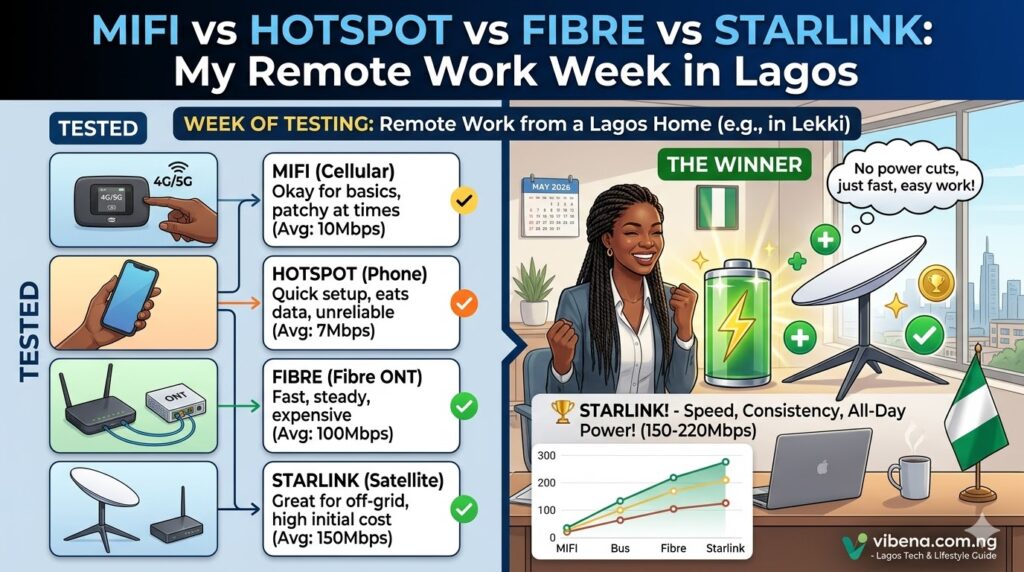
The Complete Comparison: All 4 Options Side by Side
| Metric | Phone Hotspot | MiFi | Fibre (Spectranet) | Starlink |
|---|---|---|---|---|
| Average download | 9.7 Mbps | 12.6 Mbps | 9.1 Mbps | 54.1 Mbps |
| Average upload | 3.6 Mbps | 4.9 Mbps | 4.0 Mbps | 12.9 Mbps |
| Average latency | 66 ms | 57 ms | 19 ms | 42 ms |
| Speed consistency | Poor (56% drop) | Poor (56% drop) | Excellent (<5% drop) | Good (25% drop) |
| Daily disconnections | 3.4 | 1.8 | 0 | 0.4 |
| Zoom call quality | 2.5/5 | 3.5/5 | 5/5 | 5/5 |
| 45MB upload time | 3m 12s to 6m 48s | 2m 28s to 4m 51s | 1m 38s (consistent) | 32 seconds |
| Data per month | 16.5GB (capped) | 12.5GB (capped) | Unlimited | Unlimited |
| Monthly cost (realistic) | ₦29,000 to ₦31,500 | ₦30,500 to ₦35,500 | ₦20,000 | ₦57,000 |
| Hardware cost | ₦0 (use your phone) | ₦25,000 to ₦45,000 | Installation fee | ₦590,000 |
| Needs electricity | No (phone battery) | No (MiFi battery) | Yes | Yes |
| Portable | Yes | Yes | No | Partially (Mini Kit) |
| My rating | 4/10 | 5.5/10 | 8/10 | 9/10 speed, 6/10 value |
My Honest Recommendation: It Depends on Your Budget
After living with all four options for a month, here is my recommendation for different types of Nigerian remote workers:
If You Earn Under ₦150,000/Month: MiFi + Smart Data Management
The phone hotspot and MiFi deliver similar real-world performance, but the MiFi is better because it frees your phone and provides slightly faster, more stable speeds. Pair it with the ₦15,000 MTN 40GB plan or the ₦25,000 90GB two-month bundle for better value. Keep productivity apps that work offline installed for when data runs out.
If You Earn ₦150,000 to ₦300,000/Month and Fibre Is Available: Get Fibre
Spectranet’s Elite10 at ₦20,000 per month with unlimited data is the best value in this entire test. The speed is modest (10 Mbps) but the consistency, low latency, and zero data caps make it perfect for daily remote work. If you can afford ₦25,000, the Elite20 at 20 Mbps is even better.
Use the MiFi as a backup for when fibre goes down (rare) or when you need to work outside your home.
If You Earn ₦300,000+ and Need Top Performance: Starlink
If your work requires uploading large files, attending multiple video calls daily, or streaming content, and you earn enough to justify the investment, Starlink is in a different league. But only invest if you also have a reliable power backup. Starlink without electricity is an expensive paperweight.
The Combo I Actually Use Now
After this experiment, I settled on: Spectranet fibre as my primary (I convinced my landlord to allow the installation after showing him this data) plus MTN MiFi as my backup. Total monthly cost: approximately ₦25,500 (₦20,000 fibre plus ₦5,500 for a small MiFi data plan I barely touch).
For a deeper comparison of the two satellite options, I also compared Amazon Kuiper versus Starlink for Nigeria as Amazon’s service approaches its Nigerian launch.
Tips for Getting the Best Performance From Whatever You Choose
Regardless of which option you go with, these tips will help:
Position your MiFi or phone near a window. Mobile signals are stronger with line of sight to the nearest tower. Placing your device on a windowsill instead of in a drawer improved my MiFi speeds by roughly 20% in testing.
Avoid peak hours for heavy uploads. On mobile networks, the fastest speeds are between 6 AM and 9 AM and after 10 PM. Schedule large file uploads for these windows.
Use Google Docs instead of Microsoft 365 online. Google Docs uses less bandwidth because it syncs changes incrementally. Microsoft 365 tends to re-upload entire files more frequently.
Compress images before uploading. I use free AI tools to compress images before sending them to clients. A 5MB image compressed to 1MB uploads five times faster.
Keep your Zoom camera off when possible. Video consumes roughly 1.8GB per hour on Zoom. Audio-only calls use about 0.04GB per hour. If your connection is struggling, turning off your camera can save a call from dropping.
Have a backup ready. No internet option in Nigeria is 100% reliable. Always have a secondary option (even if it is just your phone hotspot) ready to switch to. I keep my MiFi charged and loaded with a small data plan specifically for emergencies.
If you are setting up a proper home office, I covered the complete gadget and connectivity setup in my guide on essential gadgets for remote work in Nigeria.
Frequently Asked Questions
What is the best internet option for Zoom calls in Nigeria?
Based on my testing, fibre broadband (like Spectranet) provides the best Zoom call quality due to its low latency (19 ms) and rock-solid consistency. Starlink is equally good for call quality but costs significantly more. Mobile options (MiFi and phone hotspot) work for audio calls but struggle with video, especially during afternoon peak hours.
Is Starlink worth it for freelancers in Nigeria?
Only if your income justifies the cost. At ₦57,000 monthly plus the ₦590,000 hardware investment, Starlink makes financial sense for remote workers earning above ₦300,000 per month, especially those who need to upload large files or attend frequent video conferences. For lower budgets, fibre offers better value.
How much data does remote work consume per month in Nigeria?
Based on my tracking, a typical remote work routine (email, Google Docs, social media management, 4 to 5 Zoom calls per week, and moderate browsing) consumes approximately 60 to 90GB per month. If you add streaming or large file transfers, it can exceed 100GB. Capped plans on MTN or Airtel are almost always insufficient for full-time remote work.
MiFi vs phone hotspot: which is better?
The MiFi consistently outperformed the phone hotspot in my testing: 30% faster download speeds, 50% fewer disconnections, and better Zoom call quality. It also preserves your phone battery. The MiFi device costs ₦25,000 to ₦45,000 but pays for itself in improved productivity within a few weeks.
Can I use Spectranet fibre in Yaba, Lagos?
Spectranet fibre availability varies by exact location, even within the same neighbourhood. The only way to confirm is to enter your address on the Spectranet website or call their customer service. Fibre on Air (wireless fibre) may be available in areas where physical fibre cables have not been laid.
Final Thoughts
Internet connectivity in Nigeria is not a convenience. For remote workers, freelancers, and students, it is the foundation that every naira of income is built upon. A dropped Zoom call can lose you a client. A slow upload can miss a deadline. An unreliable connection can make the difference between a productive 8-hour workday and a frustrating waste of time.
After using all four options under real working conditions, the hierarchy is clear:
Starlink is the fastest and most powerful option, but it is expensive and requires reliable electricity.
Fibre is the best value for consistent, professional-grade connectivity, but it is limited by geographic availability.
MiFi is a solid mid-range option that works anywhere MTN has coverage, but data caps and speed drops during peak hours limit its usefulness for heavy work.
Phone hotspot should be your last resort, not your daily driver.
Choose the best option your budget allows. And whatever you choose, always have a backup. This is Lagos. The one thing you can count on is that nothing works 100% of the time. Plan accordingly.
Want to improve your full work-from-home setup? Check out my guides on how to set up a home office in a bedroom and how to stay focused during power outages for more practical strategies that work in Nigerian conditions.

Oladepo Babatunde (Prince Babatee Tunde) is a Computer Scientist, researcher, and professional content writer with a Higher National Diploma in Computer Science from Kwara State Polytechnic, Nigeria.
With a background in technology and a passion for clear communication, Babatunde specializes in creating thoroughly researched, reader-focused content on productivity, personal development, home living, and technology. Every article he writes is backed by extensive research and fact-checking to ensure readers receive accurate, actionable information.
As a freelance writer, he has helped brands and publications deliver content that educates, engages, and empowers their audiences. His mission at Vibena is simple: make complex topics easy to understand and help Nigerians live smarter, more productive lives.